
Quick Start
System Overview
Bitaqaty Business system offers shopping for all resellers based on the agreement made with Bitaqaty Business sales department. Resellers system can perform transactions through integration with Bitaqaty Business reseller integration API. A specific list of Bitaqaty Business products will be allowed to be purchased by each reseller according to the mentioned agreement
Upon signing the contract with Bitaqaty Business, reseller site is handed the following keys for the staging environment:
- reseller username which
has two roles:
- Acts as the username for the reseller site while viewing reseller dashboard in Bitaqaty Business system.
- Used as reseller site identifier in all communication between Bitaqaty Business and the reseller site
- Password: it should be used to view reseller dashboard on Bitaqaty Business system.
- Secret Key a key shared between Bitaqaty Business and the reseller site; it will be used by the reseller site in generating the reseller site signature (hash code) and must not be communicated over http.
Product Type
| Name | Description |
|---|---|
| credential |
|
| Serial |
|
| Service |
|
| Priced Voucher |
|
Voucher Parameters
| Name | Description |
|---|---|
| Serial | Acts as the username for the reseller site while viewing the reseller dashboard in Bitaqaty Business system |
| Secret | The voucher redemption code/ Pin Code |
| Username | An extra pin code beside the voucher redemption code used while recharging the voucher for some products like Noon Vouchers |
Credential
- serial
- username
- secret
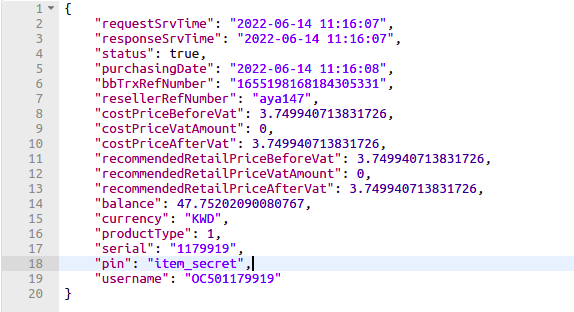
Serial
- serial
- secret
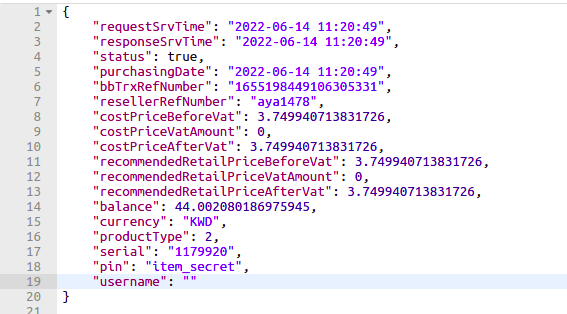
Service
- serial
- secret
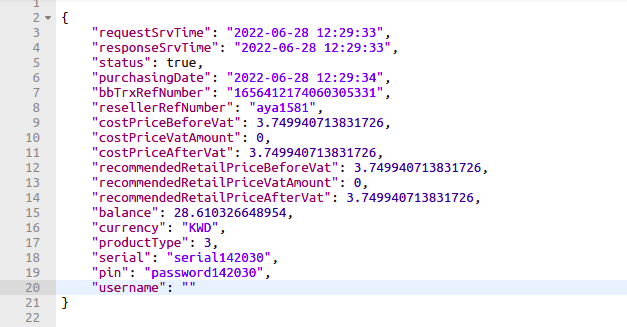
Priced Voucher
- serial
- secret
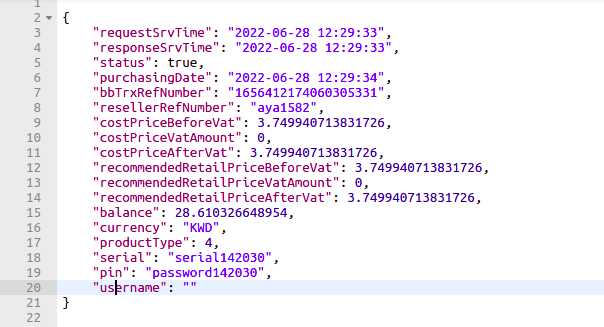
VAT Type
| Name | Description |
|---|---|
| SG | Standard Gross : VAT calculated on total product amount |
| SM | Standard Margin : VAT calculated on margin (difference between end user price and face value |
| OS | Out of scope : No VAT applied |
Notes & Recommendations
- Data synchronization or “retrieve product list” methods can be considered a high traffic operation – depending on the amount of products retrieved on response, hence it is recommended to cache response results and to call this method over long intervals such as daily or weekly basis.
- “Purchase product” operation will be executed based on Bitaqaty Business system prices, hence if a product price was updated on Bitaqaty Business system after last time reseller site performed data synchronization process, transaction will be executed on new prices, it is the reseller site responsibility to take care of updated prices.
- To avoid any inconvenience based on the above fact, “retrieve detailed product info” method should be called prior to “purchasing product” method to validate prices integrity and Vouchers availability.
- Reconciliation process should take place on daily basis and for each reseller machine.
Plain API Methods
Check Balance:
Method API:
Description
In this method, Reseller receives his current balanceRequest Flow:
- Bitaqaty Business validates
the received parameters and
sends back the response,
upon:
- Success: Bitaqaty Business return info about your Balance
- Error: Bitaqaty Business return correspondent error code; please refer to the Response Codes for more details.
Technical Considerations
Request Parameters
| Parameter Name | Data Type | Description | Cardinality | Mandatory | Length |
|---|---|---|---|---|---|
| resellerUsername | String | The reseller username defined in Bitaqaty Business System | 1 | Yes | 255 |
| password | MD5 Hash |
MD5 (resellerUsername + secretKey) |
1 | Yes | 255 |
Response Parameters
| Parameter Name | Data Type | Description | Cardinality | Mandatory | Length |
|---|---|---|---|---|---|
| requestSrvTime | Date time | Transaction Date/Time from Reseller Server | 0..1 | 255 | |
| responseSrvTime | Date time | Transaction Date/Time from Bitaqaty Business Server | 0..1 | 255 | |
| status | boolean |
|
1 | 1 | |
| errorCode | String | in case of error Response Code, refer to Response Codes | 0..1 | 255 | |
| errorMessage | String | in case of error Response Code, refer to Response Codes | 0..1 | 255 | |
| errorDesc | String | in case of error Response Desc, refer to Response Codes | 0..1 | 255 | |
| balance | double | Reseller current balance | 0..1 | 8 | |
| currency | String | Reseller currency | 0..1 | 255 |
Error codes:
| Code | Message | Description |
|---|---|---|
| 101 | MISSING_RESELLER_USERNAME | Reseller username is missing in the request parameters |
| 102 | MISSING_PASSWORD | Password is missing in request parameters |
| 201 | INVALID_RESELLER_USERNAME_OR_PASSWORD | The reseller username or password provided is incorrect. |
| 500 | INTERNAL_SYSTEM_ERROR | Something went wrong |
Code Examples :
function Rest() {
    var xmlhttp = new XMLHttpRequest();
    xmlhttp.open('POST', 'https://bbapi.ocstaging.net/integration/check-balance', true);

    var data = new FormData();
    data.append('resellerUsername', '[email protected]');
    data.append('password', '88683b0a0e5ec9ca3e81bef8009074e4');


    // Send the POST request
    xmlhttp.setRequestHeader('Content-Type', 'application/json');
    xmlhttp.setRequestHeader('Access-Control-Allow-Origin', 'https://bbapi.ocstaging.net');
    xmlhttp.setRequestHeader('Access-Control-Allow-Credentials','true')
    xmlhttp.send(data);

    xmlhttp.onreadystatechange = function () {
        if (xmlhttp.readyState == 4) {
            if (xmlhttp.status == 200) {
            alert('done. use firebug/console to see network response');
            }
        }
    }
    // send request
    // ...
    }
import requests
from requests.auth import HTTPDigestAuth
import json

# Replace with the correct URL
url = "https://bbapi.ocstaging.net/integration/check-balance"

# It is a good practice not to hardcode the credentials. So ask the user to enter credentials at runtime
myResponse = requests.post(url,json= {'resellerUsername': '[email protected]','password': '88683b0a0e5ec9ca3e81bef8009074e4'})
#print (myResponse.status_code)

# For successful API call, response code will be 200 (OK)
if(myResponse.ok):

    # Loading the response data into a dict variable
    # json.loads takes in only binary or string variables so using content to fetch binary content
    # Loads (Load String) takes a Json file and converts into python data structure (dict or list, depending on JSON)
    jData = json.loads(myResponse.content)

    print("The response contains {0} properties".format(len(jData)))
    print("\n")
    for key in jData:
        print key + " : " + jData[key]
else:
    # If response code is not ok (200), print the resulting http error code with description
    myResponse.raise_for_status()
<?php

$processed = FALSE;
$ERROR_MESSAGE = '';

// ************* Call API:
$ch = curl_init();
curl_setopt($ch, CURLOPT_URL, "https://bbapi.ocstaging.net/integration/check-balance");
curl_setopt($ch, CURLOPT_POST, 1);// set post data to true
curl_setopt($ch, CURLOPT_POSTFIELDS,"[email protected]&password=88683b0a0e5ec9ca3e81bef8009074e4");   // post data
curl_setopt($ch, CURLOPT_RETURNTRANSFER, true);
$json = curl_exec($ch);
curl_close ($ch);

// returned json string will look like this: {"code":1,"data":"OK"}
// "code" may contain an error code and "data" may contain error string instead of "OK"
$obj = json_decode($json);

if ($obj->{'code'} == '1')
{
  $processed = TRUE;
}else{
  $ERROR_MESSAGE = $obj->{'data'};
}

...

if (!$processed && $ERROR_MESSAGE != '') {
    echo $ERROR_MESSAGE;
}

?>
import java.io.BufferedReader;
import java.io.IOException;
import java.io.InputStreamReader;
import java.io.PrintStream;
import java.net.URL;
import java.net.URLConnection;

public class HWS {

    public static void main(String[] args) throws IOException {
        URL url = new URL("https://bbapi.ocstaging.net/integration/check-balance");
        //Insert your JSON query request
        String query = "{'resellerUsername': '[email protected]','password': '88683b0a0e5ec9ca3e81bef8009074e4'}";
        //It change the apostrophe char to double quote char, to form a correct JSON string
        query=query.replace("'", "\"");

        try{
            //make connection
            URLConnection urlc = url.openConnection();
            //It Content Type is so important to support JSON call
            urlc.setRequestProperty("Content-Type", "application/xml");
            Msj("connection: " + url.toString());
            //use post mode
            urlc.setDoOutput(true);
            urlc.setAllowUserInteraction(false);

            //send query
            PrintStream ps = new PrintStream(urlc.getOutputStream());
            ps.print(query);
            Msj("Query: " + query);
            ps.close();

            //get result
            BufferedReader br = new BufferedReader(new InputStreamReader(urlc.getInputStream()));
            String l = null;
            while ((l=br.readLine())!=null) {
                Msj(l);
            }
            br.close();
        } catch (Exception e){
            Msj("Error occured");
            Msj(e.toString());
        }
    }

    private static void Msj(String text){
        System.out.println(text);
    }
}
Get Detailed Products List:
Method API:
Description
Reseller receives a list of his assigned products along with their detailed informationRequest Flow
- Bitaqaty Business validates the
received parameters and sends back
the
response,
upon:
- Success: Bitaqaty Business return list of products that assigned to your account with their detailed information
- Error: Bitaqaty Business return correspondent error code; please refer to the Response Codes for more details.
Technical Considerations
Request Parameters
| Parameter Name | Data Type | Description | Cardinality | Mandatory | Length |
|---|---|---|---|---|---|
| resellerUsername | String | The reseller username defined in Bitaqaty Business System | 1 | Yes | 255 |
| password | MD5 Hash |
MD5 (ResellerUsername +merchantId secretKey) |
1 | Yes | 255 |
| merchantId | Long | The merchant ID | 1 | No | 255 |
| responseParams | String | List of response parameters name | 1 | No | 255 |
Note:
- All parameters are required.
-
The merchant ID field is mandatory, however you can send it with empty
value to retrieve the full product list assigned to your account.
Note 1: This action could take more seconds than the normal request to
retrieve the response because it loads and calculates all the product
list with all its information, so we highly recommend to use it while
loading the list for the first time, and with rare cases.
Note 2: You can get the list of merchantID separately by calling the API Merchant List - responseParams: This is an optional parameter you could send it with the value of the exact name for the needed parameters to be retrieved with the API response, The exact names of the parameters should be separated by comma.
Response Parameters
| Parameter Name | Data Type | Description | Cardinality | Mandatory | Length |
|---|---|---|---|---|---|
| requestSrvTime | Date time | Transaction Date/Time from Reseller Server | 0..1 | 255 | |
| responseSrvTime | Date time | Transaction Date/Time from Bitaqaty Business Server | 0..1 | 255 | |
| status | boolean |
|
1 | 1 | |
| errorCode | String | in case of error Response Code, refer to Response Codes | 0..1 | 255 | |
| errorMessage | String | in case of error Response Code, refer to Response Codes | 0..1 | 255 | |
| errorDesc | String | in case of error Response Desc, refer to Response Codes | 0..1 | 255 | |
| products | list of products | List of products objects, refer to below table | 0..* | List of products |
| Parameter Name | Data Type | Description | Cardinality | Mandatory | Length |
|---|---|---|---|---|---|
| productID | String | Bitaqaty Business product code | 0..1 | 255 | |
| nameAr | String | Product name in Arabic | 0..1 | 255 | |
| nameEn | String | Product name in English | 1 | 255 | |
| vatType | String | Type of VAT on product | 0..1 | 255 | |
| vatPercentage | double | Percentage of VAT applied on reseller’s country | 0..1 | 8 | |
| faceValue | double | Exact value of voucher | 0..1 | 8 | |
| costPriceBeforeVat | double | Reseller’s used price before adding VAT (in reseller’s currency) | 0..1 | 8 | |
| costPriceVatAmount | double | VAT calculated on product’s cost price | 0..1 | 8 | |
| costPriceAfterVat | double | Reseller’s used price after adding cost price VAT amount (in reseller’s currency) | 0..1 | 8 | |
| recommendedRetailPriceBeforeVat | double | Reseller’s end user price provided by the reseller (before VAT) in case it is provided (in reseller’s currency). If not provided, will return Bitaqaty business’ customer price (in reseller’s currency) | 0..1 | 8 | |
| recommendedRetailPriceVatAmount | double | VAT calculated on recommended retail price | 0..1 | 8 | |
| recommendedRetailPriceAfterVat | double | Reseller’s end user price if provided by reseller or Bitaqaty business’ customer price after adding recommended retail price VAT amount | 0..1 | 8 | |
| currency | String | Reseller’s Currency | 0..1 | 255 | |
| available | boolean |
|
0..1 | 1 | |
| merchantid | Long | ID of Merchant | 0..1 | 8 | |
| merchantNameAr | String | Merchant name in Arabic | 0..1 | 255 | |
| merchantNameEn | String | Merchant name in English | 0..1 | 255 | |
| categoryNameAr | String | Category Name in English (Hidden categories will not be displayed). Also, in case product is assigned to more than one category, will display the first category | 0..1 | 255 | |
| categoryNameEn | String | Category Name in English (Hidden categories will not be displayed). Also, in case product is assigned to more than one category, will display the first category | 1 | 255 | |
| howToUseAr | String | How to use in Arabic defined in Merchant Profile | 0..1 | 255 | |
| howToUseEn | String | How to use in English defined in Merchant Profile | 0..1 | 255 | |
| image | String | Product image URL | 0..1 | 255 | |
| esimSpecifications | List of eSIM Specification Fields |
A list of EsimSpecification objects returned only if the product is an eSIM
(isQrcode = true). Each object contains the following fields: data, calls, and duration, each represented as a String value.) |
0..* | No | - |
| inquiryRequired | boolean | Indicates whether an inquiry step is required before purchase. | 0..1 | No | 1 |
| dynamicFormList | List of Dynamic Form Fields |
List of dynamic form field objects. Refer to the below table for field details. |
0..* | No | - |
| Parameter Name | Data Type | Description | Cardinality | Mandatory | Length |
|---|---|---|---|---|---|
| inputType | String | Type of input field ( Character, Number, List) | 1 | Yes | 50 |
| inputName | String | Internal name of the field | 1 | Yes | 255 |
| inputTitleEn | String | Label/title of the field in English | 0..1 | No | 255 |
| inputTitleAr | String | Label/title of the field in Arabic | 0..1 | No | 255 |
| inputPlaceHolderEn | String | Placeholder text in English | 0..1 | No | 255 |
| inputPlaceHolderAr | String | Placeholder text in Arabic | 0..1 | No | 255 |
| inputDefaultValue | String | Default value of the field | 0..1 | No | 255 |
| inputLength | Integer | Length of the input if applicable | 0..1 | No | 8 |
| serviceId | Long | Service ID associated with the field | 0..1 | No | 8 |
| position | Integer | Position/order of the field in the form | 0..1 | No | 8 |
| visible | Boolean | Indicates if the field is visible to the user | 0..1 | No | 1 |
| required | Boolean | Indicates if the field is required | 0..1 | No | 1 |
| clientId | Boolean | Indicates if the field is related to the client ID | 0..1 | No | 1 |
| minLength | Integer | Minimum length allowed for input | 0..1 | No | 8 |
| maxLength | Integer | Maximum length allowed for input | 0..1 | No | 8 |
| confirmRequired | Boolean | Indicates if confirmation input is required | 0..1 | No | 1 |
| isDynamicField | Boolean | Indicates if the field is dynamically generated | 0..1 | No | 1 |
| minValue | Double | Minimum value for numeric input | 0..1 | No | 8 |
| maxValue | Double | Maximum value for numeric input | 0..1 | No | 8 |
| productDenominationList | List of Product Denomination Fields |
List of Product Denomination field objects. Refer to the below table for field details. |
0..* | No | - |
| Parameter Name | Data Type | Description | Cardinality | Mandatory | Length |
|---|---|---|---|---|---|
| amount | Double | Transaction amount entered by the user | 1 | Yes | N/A |
| unitAr | String | Unit name displayed in Arabic | 1 | No | 255 |
| unitEn | String | Unit name displayed in English | 0..1 | No | 255 |
| amountInProductCurrency | Double | Amount converted to the product’s base currency | 0..1 | Yes | N/A |
| vat | Double | Value Added Tax applied to the transaction | 0..1 | Yes | N/A |
| fees | Double | Service or processing fees charged for the transaction | 0..1 | Yes | N/A |
| price | Double | Base price of the product excluding VAT and any additional fees | 0..1 | Yes | N/A |
Error codes:
| Code | Message | Description |
|---|---|---|
| 101 | MISSING_RESELLER_USERNAME | Reseller username is missing in the request parameters |
| 102 | MISSING_PASSWORD | Password is missing in request parameters |
| 201 | INVALID_RESELLER_USERNAME_OR_PASSWORD | The reseller username or password provided is incorrect. |
| 203 | INVALID_MERCHANT_ID | MerchantId is with incorrect format |
| 305 | NO_PRODUCTS_FOUND | No Products Found |
| 500 | INTERNAL_SYSTEM_ERROR | Something went wrong |
Code Examples :
function Rest() {
    var xmlhttp = new XMLHttpRequest();
    xmlhttp.open('POST', 'https://bbapi.ocstaging.net/integration/detailed-products-list', true);

    var data = new FormData();
    data.append('resellerUsername', '[email protected]');
    data.append('password', '88683b0a0e5ec9ca3e81bef8009074e4');
    data.append('merchantId '123');


    // Send the POST request
    xmlhttp.setRequestHeader('Content-Type', 'application/json');
    xmlhttp.setRequestHeader('Access-Control-Allow-Origin', 'https://bbapi.ocstaging.net');
    xmlhttp.setRequestHeader('Access-Control-Allow-Credentials','true')
    xmlhttp.send(data);

    xmlhttp.onreadystatechange = function () {
        if (xmlhttp.readyState == 4) {
            if (xmlhttp.status == 200) {
            alert('done. use firebug/console to see network response');
            }
        }
    }
    // send request
    // ...
    }
import requests
from requests.auth import HTTPDigestAuth
import json

# Replace with the correct URL
url = "https://bbapi.ocstaging.net/integration/detailed-products-list"

# It is a good practice not to hardcode the credentials. So ask the user to enter credentials at runtime
myResponse = requests.post(url,json= {'resellerUsername': '[email protected]','password': '88683b0a0e5ec9ca3e81bef8009074e4','merchantId':'123'})
#print (myResponse.status_code)

# For successful API call, response code will be 200 (OK)
if(myResponse.ok):

    # Loading the response data into a dict variable
    # json.loads takes in only binary or string variables so using content to fetch binary content
    # Loads (Load String) takes a Json file and converts into python data structure (dict or list, depending on JSON)
    jData = json.loads(myResponse.content)

    print("The response contains {0} properties".format(len(jData)))
    print("\n")
    for key in jData:
        print key + " : " + jData[key]
else:
    # If response code is not ok (200), print the resulting http error code with description
    myResponse.raise_for_status()
<?php

$processed = FALSE;
$ERROR_MESSAGE = '';

// ************* Call API:
$ch = curl_init();
curl_setopt($ch, CURLOPT_URL, "https://bbapi.ocstaging.net/integration/detailed-products-list");
curl_setopt($ch, CURLOPT_POST, 1);// set post data to true
curl_setopt($ch, CURLOPT_POSTFIELDS,"[email protected]&password=88683b0a0e5ec9ca3e81bef8009074e4&merchantId=123");   // post data
curl_setopt($ch, CURLOPT_RETURNTRANSFER, true);
$json = curl_exec($ch);
curl_close ($ch);

// returned json string will look like this: {"code":1,"data":"OK"}
// "code" may contain an error code and "data" may contain error string instead of "OK"
$obj = json_decode($json);

if ($obj->{'code'} == '1')
{
  $processed = TRUE;
}else{
  $ERROR_MESSAGE = $obj->{'data'};
}

...

if (!$processed && $ERROR_MESSAGE != '') {
    echo $ERROR_MESSAGE;
}

?>
import java.io.BufferedReader;
import java.io.IOException;
import java.io.InputStreamReader;
import java.io.PrintStream;
import java.net.URL;
import java.net.URLConnection;

public class HWS {

    public static void main(String[] args) throws IOException {
        URL url = new URL("https://bbapi.ocstaging.net/integration/detailed-products-list");
        //Insert your JSON query request
        String query = "{'resellerUsername': '[email protected]','password': '88683b0a0e5ec9ca3e81bef8009074e4','merchantId':'123'}";
        //It change the apostrophe char to double quote char, to form a correct JSON string
        query=query.replace("'", "\"");

        try{
            //make connection
            URLConnection urlc = url.openConnection();
            //It Content Type is so important to support JSON call
            urlc.setRequestProperty("Content-Type", "application/xml");
            Msj("connection: " + url.toString());
            //use post mode
            urlc.setDoOutput(true);
            urlc.setAllowUserInteraction(false);

            //send query
            PrintStream ps = new PrintStream(urlc.getOutputStream());
            ps.print(query);
            Msj("Query: " + query);
            ps.close();

            //get result
            BufferedReader br = new BufferedReader(new InputStreamReader(urlc.getInputStream()));
            String l = null;
            while ((l=br.readLine())!=null) {
                Msj(l);
            }
            br.close();
        } catch (Exception e){
            Msj("Error occured");
            Msj(e.toString());
        }
    }

    private static void Msj(String text){
        System.out.println(text);
    }
}
Get Detailed Bill Products List:
Method API:
Description
Reseller receives a list of his assigned bill products along with their detailed informationRequest Flow
- Bitaqaty Business validates the
received parameters and sends back
the
response,
upon:
- Success: Bitaqaty Business return list of products that assigned to your account with their detailed information
- Error: Bitaqaty Business return correspondent error code; please refer to the Response Codes for more details.
Technical Considerations
Request Parameters
| Parameter Name | Data Type | Description | Cardinality | Mandatory | Length |
|---|---|---|---|---|---|
| resellerUsername | String | The reseller username defined in Bitaqaty Business System | 1 | Yes | 255 |
| password | MD5 Hash |
MD5 (ResellerUsername +merchantId secretKey) |
1 | Yes | 255 |
| merchantId | Long | The merchant id of bill | 1 | No | 255 |
| responseParams | String | List of response parameters name | 1 | No | 255 |
Note:
- All parameters are required.
-
The merchant ID field is mandatory, however you can send it with empty
value to retrieve the full product list assigned to your account.
Note 1: This action could take more seconds than the normal request to
retrieve the response because it loads and calculates all the product
list with all its information, so we highly recommend to use it while
loading the list for the first time, and with rare cases.
Note 2: You can get the list of merchantID separately by calling the API Merchant List - responseParams: This is an optional parameter you could send it with the value of the exact name for the needed parameters to be retrieved with the API response, The exact names of the parameters should be separated by comma.
Response Parameters
| Parameter Name | Data Type | Description | Cardinality | Mandatory | Length |
|---|---|---|---|---|---|
| requestSrvTime | Date time | Transaction Date/Time from Reseller Server | 0..1 | 255 | |
| responseSrvTime | Date time | Transaction Date/Time from Bitaqaty Business Server | 0..1 | 255 | |
| status | boolean |
|
1 | 1 | |
| errorCode | String | in case of error Response Code, refer to Response Codes | 0..1 | 255 | |
| errorMessage | String | in case of error Response Code, refer to Response Codes | 0..1 | 255 | |
| errorDesc | String | in case of error Response Desc, refer to Response Codes | 0..1 | 255 | |
| billProducts | list of products | List of products objects, refer to below table | 0..* | List of products |
| Parameter Name | Data Type | Description | Cardinality | Mandatory | Length |
|---|---|---|---|---|---|
| productID | String | Bitaqaty Business product code | 0..1 | 255 | |
| nameAr | String | Product name in Arabic | 0..1 | 255 | |
| nameEn | String | Product name in English | 1 | 255 | |
| vatType | String | Type of VAT on product | 0..1 | 255 | |
| vatPercentage | double | Percentage of VAT applied on reseller’s country | 0..1 | 8 | |
| currency | String | Reseller’s Currency | 0..1 | 255 | |
| available | boolean |
|
0..1 | 1 | |
| merchantid | Long | ID of Merchant | 0..1 | 8 | |
| merchantNameAr | String | Merchant name in Arabic | 0..1 | 255 | |
| merchantNameEn | String | Merchant name in English | 0..1 | 255 | |
| categoryNameAr | String | Category Name in English (Hidden categories will not be displayed). Also, in case product is assigned to more than one category, will display the first category | 0..1 | 255 | |
| categoryNameEn | String | Category Name in English (Hidden categories will not be displayed). Also, in case product is assigned to more than one category, will display the first category | 1 | 255 | |
| howToUseAr | String | How to use in Arabic defined in Merchant Profile | 0..1 | 255 | |
| howToUseEn | String | How to use in English defined in Merchant Profile | 0..1 | 255 | |
| image | String | Product image URL | 0..1 | 255 | |
| inquiryRequired | boolean | Indicates whether an inquiry step is required before purchase. | 0..1 | No | 1 |
| dynamicFormList | List of Dynamic Form Fields |
List of dynamic form field objects. Refer to the below table for field details. |
0..* | No | - |
| Parameter Name | Data Type | Description | Cardinality | Mandatory | Length |
|---|---|---|---|---|---|
| inputType | String | Type of input field ( Character, Number, List) | 1 | Yes | 50 |
| inputName | String | Internal name of the field | 1 | Yes | 255 |
| inputTitleEn | String | Label/title of the field in English | 0..1 | No | 255 |
| inputTitleAr | String | Label/title of the field in Arabic | 0..1 | No | 255 |
| inputPlaceHolderEn | String | Placeholder text in English | 0..1 | No | 255 |
| inputPlaceHolderAr | String | Placeholder text in Arabic | 0..1 | No | 255 |
| inputDefaultValue | String | Default value of the field | 0..1 | No | 255 |
| inputLength | Integer | Length of the input if applicable | 0..1 | No | 8 |
| serviceId | Long | Service ID associated with the field | 0..1 | No | 8 |
| position | Integer | Position/order of the field in the form | 0..1 | No | 8 |
| visible | Boolean | Indicates if the field is visible to the user | 0..1 | No | 1 |
| required | Boolean | Indicates if the field is required | 0..1 | No | 1 |
| clientId | Boolean | Indicates if the field is related to the client ID | 0..1 | No | 1 |
| minLength | Integer | Minimum length allowed for input | 0..1 | No | 8 |
| maxLength | Integer | Maximum length allowed for input | 0..1 | No | 8 |
| confirmRequired | Boolean | Indicates if confirmation input is required | 0..1 | No | 1 |
| isDynamicField | Boolean | Indicates if the field is dynamically generated | 0..1 | No | 1 |
| minValue | Double | Minimum value for numeric input | 0..1 | No | 8 |
| maxValue | Double | Maximum value for numeric input | 0..1 | No | 8 |
| productDenominationList | List of Product Denomination Fields |
List of Product Denomination field objects. Refer to the below table for field details. |
0..* | No | - |
| Parameter Name | Data Type | Description | Cardinality | Mandatory | Length |
|---|---|---|---|---|---|
| amount | Double | Transaction amount entered by the user | 1 | Yes | N/A |
| unitAr | String | Unit name displayed in Arabic | 1 | No | 255 |
| unitEn | String | Unit name displayed in English | 0..1 | No | 255 |
| amountInProductCurrency | Double | Amount converted to the product’s base currency | 0..1 | Yes | N/A |
| vat | Double | Value Added Tax applied to the transaction | 0..1 | Yes | N/A |
| fees | Double | Service or processing fees charged for the transaction | 0..1 | Yes | N/A |
| price | Double | Base price of the product excluding VAT and any additional fees | 0..1 | Yes | N/A |
Error codes:
| Code | Message | Description |
|---|---|---|
| 101 | MISSING_RESELLER_USERNAME | Reseller username is missing in the request parameters |
| 102 | MISSING_PASSWORD | Password is missing in request parameters |
| 201 | INVALID_RESELLER_USERNAME_OR_PASSWORD | The reseller username or password provided is incorrect. |
| 203 | INVALID_MERCHANT_ID | MerchantId is with incorrect format |
| 305 | NO_PRODUCTS_FOUND | No Products Found |
| 500 | INTERNAL_SYSTEM_ERROR | Something went wrong |
Code Examples :
function Rest() {
    var xmlhttp = new XMLHttpRequest();
    xmlhttp.open('POST', 'https://bbapi.ocstaging.net/integration/detailed-bill-products-list', true);

    var data = new FormData();
    data.append('resellerUsername', '[email protected]');
    data.append('password', '88683b0a0e5ec9ca3e81bef8009074e4');
    data.append('merchantId '123');


    // Send the POST request
    xmlhttp.setRequestHeader('Content-Type', 'application/json');
    xmlhttp.setRequestHeader('Access-Control-Allow-Origin', 'https://bbapi.ocstaging.net');
    xmlhttp.setRequestHeader('Access-Control-Allow-Credentials','true')
    xmlhttp.send(data);

    xmlhttp.onreadystatechange = function () {
        if (xmlhttp.readyState == 4) {
            if (xmlhttp.status == 200) {
            alert('done. use firebug/console to see network response');
            }
        }
    }
    // send request
    // ...
    }
import requests
from requests.auth import HTTPDigestAuth
import json

# Replace with the correct URL
url = "https://bbapi.ocstaging.net/integration/detailed-bill-products-list"

# It is a good practice not to hardcode the credentials. So ask the user to enter credentials at runtime
myResponse = requests.post(url,json= {'resellerUsername': '[email protected]','password': '88683b0a0e5ec9ca3e81bef8009074e4','merchantId':'123'})
#print (myResponse.status_code)

# For successful API call, response code will be 200 (OK)
if(myResponse.ok):

    # Loading the response data into a dict variable
    # json.loads takes in only binary or string variables so using content to fetch binary content
    # Loads (Load String) takes a Json file and converts into python data structure (dict or list, depending on JSON)
    jData = json.loads(myResponse.content)

    print("The response contains {0} properties".format(len(jData)))
    print("\n")
    for key in jData:
        print key + " : " + jData[key]
else:
    # If response code is not ok (200), print the resulting http error code with description
    myResponse.raise_for_status()
<?php

$processed = FALSE;
$ERROR_MESSAGE = '';

// ************* Call API:
$ch = curl_init();
curl_setopt($ch, CURLOPT_URL, "https://bbapi.ocstaging.net/integration/detailed-bill-products-list");
curl_setopt($ch, CURLOPT_POST, 1);// set post data to true
curl_setopt($ch, CURLOPT_POSTFIELDS,"[email protected]&password=88683b0a0e5ec9ca3e81bef8009074e4&merchantId=123");   // post data
curl_setopt($ch, CURLOPT_RETURNTRANSFER, true);
$json = curl_exec($ch);
curl_close ($ch);

// returned json string will look like this: {"code":1,"data":"OK"}
// "code" may contain an error code and "data" may contain error string instead of "OK"
$obj = json_decode($json);

if ($obj->{'code'} == '1')
{
  $processed = TRUE;
}else{
  $ERROR_MESSAGE = $obj->{'data'};
}

...

if (!$processed && $ERROR_MESSAGE != '') {
    echo $ERROR_MESSAGE;
}

?>
import java.io.BufferedReader;
import java.io.IOException;
import java.io.InputStreamReader;
import java.io.PrintStream;
import java.net.URL;
import java.net.URLConnection;

public class HWS {

    public static void main(String[] args) throws IOException {
        URL url = new URL("https://bbapi.ocstaging.net/integration/detailed-bill-products-list");
        //Insert your JSON query request
        String query = "{'resellerUsername': '[email protected]','password': '88683b0a0e5ec9ca3e81bef8009074e4','merchantId':'123'}";
        //It change the apostrophe char to double quote char, to form a correct JSON string
        query=query.replace("'", "\"");

        try{
            //make connection
            URLConnection urlc = url.openConnection();
            //It Content Type is so important to support JSON call
            urlc.setRequestProperty("Content-Type", "application/xml");
            Msj("connection: " + url.toString());
            //use post mode
            urlc.setDoOutput(true);
            urlc.setAllowUserInteraction(false);

            //send query
            PrintStream ps = new PrintStream(urlc.getOutputStream());
            ps.print(query);
            Msj("Query: " + query);
            ps.close();

            //get result
            BufferedReader br = new BufferedReader(new InputStreamReader(urlc.getInputStream()));
            String l = null;
            while ((l=br.readLine())!=null) {
                Msj(l);
            }
            br.close();
        } catch (Exception e){
            Msj("Error occured");
            Msj(e.toString());
        }
    }

    private static void Msj(String text){
        System.out.println(text);
    }
}
Bill Inquire:
Method API:
Description
Reseller receives a bill inquire detailed informationRequest Flow
- Bitaqaty Business validates the
received parameters and sends back
the
response,
upon:
- Success: Bitaqaty Business return bill inquire detailed information
- Error: Bitaqaty Business return correspondent error code; please refer to the Response Codes for more details.
Technical Considerations
Request Parameters
| Parameter Name | Data Type | Description | Cardinality | Mandatory | Length |
|---|---|---|---|---|---|
| resellerUsername | String | The reseller username defined in Bitaqaty Business System | 1 | Yes | 255 |
| password | MD5 Hash |
MD5(resellerUsername + productId + secretKey) |
1 | Yes | 255 |
| productId | String | The Product ID | 1 | Yes | 255 |
| inputParameters | JSON Object (Key-Value) |
The keys are defined in the product's
dynamicFormList.
Example: { "inputName": "12345","inputName2": "12345" } |
1..* | Yes | - |
Note:
- All parameters are required.
- inputParameters are dynamic and vary by product. Please check the product’s dynamicFormList when fetching product details.
Response Parameters
| Parameter Name | Data Type | Description | Cardinality | Mandatory | Length |
|---|---|---|---|---|---|
| requestSrvTime | Date time | Transaction Date/Time from Reseller Server | 0..1 | 255 | |
| responseSrvTime | Date time | Transaction Date/Time from Bitaqaty Business Server | 0..1 | 255 | |
| status | boolean |
|
1 | 1 | |
| errorCode | String | in case of error Response Code, refer to Response Codes | 0..1 | 255 | |
| errorMessage | String | in case of error Response Code, refer to Response Codes | 0..1 | 255 | |
| errorDesc | String | in case of error Response Desc, refer to Response Codes | 0..1 | 255 |
| Parameter Name | Data Type | Description | Cardinality | Mandatory | Length |
|---|---|---|---|---|---|
| inquireReferenceNumber | String | inquire Reference Number | 0..1 | 255 | |
| requestStatus | String | Status Of Request (Success Or Failed) | 0..1 | 255 | |
| serviceHubStatusEnum | String | Success, Service Hub Not available, User Not Authrized, No Due Bills, Failed, Invalid Amount; | 1 | 255 | |
| consumerNumber | String | Consumer Number | 0..1 | 255 | |
| dueDate | Date | due Date | 0..1 | NO | 255 |
| billStatus | String | Status Of Request (Successful , PAID Or UNPAID) | 0..1 | 255 | |
| billAmount | double | Amount of Bill | 0..1 | 8 | |
| costPriceBeforeVat | double | Reseller’s used price before adding VAT (in reseller’s currency) | 0..1 | 8 | |
| costPriceVatAmount | double | VAT calculated on product’s cost price | 0..1 | 8 | |
| costPriceAfterVat | double | Reseller’s used price after adding cost price VAT amount (in reseller’s currency) | 0..1 | 8 | |
| recommendedRetailPriceBeforeVat | double | Reseller’s end user price provided by the reseller (before VAT) in case it is provided (in reseller’s currency). If not provided, will return Bitaqaty business’ customer price (in reseller’s currency) | 0..1 | 8 | |
| recommendedRetailPriceVatAmount | double | VAT calculated on recommended retail price | 0..1 | 8 | |
| recommendedRetailPriceAfterVat | double | Reseller’s end user price if provided by reseller or Bitaqaty business’ customer price after adding recommended retail price VAT amount | 0..1 | 8 | |
| inquiryInfoText | String (Multiline) | Detailed information about the bill, including customer name, invoice details, due amount, dates, etc. | 0..1 | NO | 255 |
Error codes:
| Code | Message | Description |
|---|---|---|
| 101 | MISSING_RESELLER_USERNAME | Reseller username is missing in the request parameters |
| 102 | MISSING_PASSWORD | Password is missing in request parameters |
| 103 | MISSING_PRODUCT_CODE | Missing Product Code |
| 123 | MISSING_INPUT_PARAMETERS | Missing Input Parameters |
| 201 | INVALID_RESELLER_USERNAME_OR_PASSWORD | The reseller username or password provided is incorrect. |
| 209 | REQUEST_NOT_ALLOWED | Request Not Allowed |
| 400 | SERVICE_NOT_AVAILABLE | Service Not Available |
| 500 | INTERNAL_SYSTEM_ERROR | Something went wrong |
Code Examples :
function Rest() {
    var data = {
        productId: "333",
        inputParameters: {
            customer_id: "5453"
        },
        resellerUsername: "[email protected]",
        password: "94aec00765c9611bb9cf6e1b853d8c29"
    };

    var xmlhttp = new XMLHttpRequest();
    xmlhttp.open('POST', 'https://bbapi.ocstaging.net/integration/service-bill-inquire', true);

    // Set JSON content type
    xmlhttp.setRequestHeader('Content-Type', 'application/json');

    // Define response handler BEFORE sending
    xmlhttp.onreadystatechange = function () {
        if (xmlhttp.readyState === 4) {
            if (xmlhttp.status === 200) {
                console.log('Response:', xmlhttp.responseText);
                alert('Request completed! Check console for details.');
            } else {
                console.error('Error:', xmlhttp.status, xmlhttp.responseText);
                alert('Error occurred. Check console for details.');
            }
        }
    };

    // Request data


    // Send JSON body
    xmlhttp.send(JSON.stringify(data));
}
import requests
from requests.auth import HTTPDigestAuth
import json

# Replace with the correct URL
url = "https://bbapi.ocstaging.net/integration/service-bill-inquire"

# It is a good practice not to hardcode the credentials. So ask the user to enter credentials at runtime
myResponse = requests.post(url,json= {'resellerUsername': '[email protected]','password': '88683b0a0e5ec9ca3e81bef8009074e4','productId':'123',  'inputParameters': {
    "customer_id": "5453"
}})
#print (myResponse.status_code)

# For successful API call, response code will be 200 (OK)
if(myResponse.ok):

    # Loading the response data into a dict variable
    # json.loads takes in only binary or string variables so using content to fetch binary content
    # Loads (Load String) takes a Json file and converts into python data structure (dict or list, depending on JSON)
    jData = json.loads(myResponse.content)

    print("The response contains {0} properties".format(len(jData)))
    print("\n")
    for key in jData:
        print key + " : " + jData[key]
else:
    # If response code is not ok (200), print the resulting http error code with description
    myResponse.raise_for_status()
<?php

$processed = FALSE;
$ERROR_MESSAGE = '';

// ************* Call API:
$ch = curl_init();
curl_setopt($ch, CURLOPT_URL, "https://bbapi.ocstaging.net/integration/service-bill-inquire");
curl_setopt($ch, CURLOPT_POST, 1);// set post data to true
curl_setopt($ch, CURLOPT_POSTFIELDS, json_encode([
    "productId" => "333",
    "inputParameters" => [
        "customer_id" => "5453"
    ],
    "resellerUsername" => "[email protected]",
    "password" => "94aec00765c9611bb9cf6e1b853d8c29"
]));
curl_setopt($ch, CURLOPT_RETURNTRANSFER, true);
$json = curl_exec($ch);
curl_close ($ch);

// returned json string will look like this: {"code":1,"data":"OK"}
// "code" may contain an error code and "data" may contain error string instead of "OK"
$obj = json_decode($json);

if ($obj->{'code'} == '1')
{
  $processed = TRUE;
}else{
  $ERROR_MESSAGE = $obj->{'data'};
}

...

if (!$processed && $ERROR_MESSAGE != '') {
    echo $ERROR_MESSAGE;
}

?>
import java.io.BufferedReader;
import java.io.IOException;
import java.io.InputStreamReader;
import java.io.PrintStream;
import java.net.URL;
import java.net.URLConnection;

public class HWS {

    public static void main(String[] args) throws IOException {
        URL url = new URL("https://bbapi.ocstaging.net/integration/service-bill-inquire");
        //Insert your JSON query request
        String query = "{'resellerUsername': '[email protected]','password': '88683b0a0e5ec9ca3e81bef8009074e4','productId':'123', 'inputParameters': {
            'customer_id': '01000000000'
          }}";
        //It change the apostrophe char to double quote char, to form a correct JSON string
        query=query.replace("'", "\"");

        try{
            //make connection
            URLConnection urlc = url.openConnection();
            //It Content Type is so important to support JSON call
            urlc.setRequestProperty("Content-Type", "application/xml");
            Msj("connection: " + url.toString());
            //use post mode
            urlc.setDoOutput(true);
            urlc.setAllowUserInteraction(false);

            //send query
            PrintStream ps = new PrintStream(urlc.getOutputStream());
            ps.print(query);
            Msj("Query: " + query);
            ps.close();

            //get result
            BufferedReader br = new BufferedReader(new InputStreamReader(urlc.getInputStream()));
            String l = null;
            while ((l=br.readLine())!=null) {
                Msj(l);
            }
            br.close();
        } catch (Exception e){
            Msj("Error occured");
            Msj(e.toString());
        }
    }

    private static void Msj(String text){
        System.out.println(text);
    }
}
Top-Up Inquire:
Method API:
Description
Reseller receives the calculated top-up amount for the selected product.Request Flow
- Bitaqaty Business validates the received parameters and sends back the response:
- Success: Returns calculated top-up amount.
- Error: Returns error code; refer to Response Codes.
Technical Considerations
Request Parameters
| Parameter Name | Data Type | Description | Cardinality | Mandatory | Length |
|---|---|---|---|---|---|
| resellerUsername | String | The reseller username defined in Bitaqaty Business System | 1 | Yes | 255 |
| password | MD5 Hash | MD5(resellerUsername + productId + secretKey) | 1 | Yes | 255 |
| productId | String | The Product ID | 1 | Yes | 255 |
| amount | Double | Amount to top-up. Minimum value is 5. | 1 | Yes | - |
Response Parameters
| Parameter Name | Data Type | Description | Cardinality | Mandatory | Length |
|---|---|---|---|---|---|
| status | boolean | True if success, false if error | 1 | Yes | 1 |
| errorCode | String | Error code if request failed | 0..1 | No | 255 |
| errorMessage | String | Error description if request failed | 0..1 | No | 255 |
| errorDesc | String | in case of error Response Desc, refer to Response Codes | 0..1 | NO | 255 |
| Parameter Name | Data Type | Description | Cardinality | Mandatory | Length |
|---|---|---|---|---|---|
| costPriceBeforeVat | double | Reseller’s used price before adding VAT (in reseller’s currency) | 0..1 | 8 | |
| costPriceVatAmount | double | VAT calculated on product’s cost price | 0..1 | 8 | |
| costPriceAfterVat | double | Reseller’s used price after adding cost price VAT amount (in reseller’s currency) | 0..1 | 8 | |
| recommendedRetailPriceBeforeVat | double | Reseller’s end user price provided by the reseller (before VAT) in case it is provided (in reseller’s currency). If not provided, will return Bitaqaty business’ customer price (in reseller’s currency) | 0..1 | 8 | |
| recommendedRetailPriceVatAmount | double | VAT calculated on recommended retail price | 0..1 | 8 | |
| recommendedRetailPriceAfterVat | double | Reseller’s end user price if provided by reseller or Bitaqaty business’ customer price after adding recommended retail price VAT amount | 0..1 | 8 |
Error codes:
| Code | Message | Description |
|---|---|---|
| 101 | MISSING_RESELLER_USERNAME | Reseller username is missing in the request parameters |
| 102 | MISSING_PASSWORD | Password is missing in request parameters |
| 103 | MISSING_PRODUCT_CODE | Missing Product Code |
| 124 | MISSING_AMOUNT | Missing Top-Up Amount |
| 126 | INVALID_AMOUNT | Amount is less than the minimum allowed (5) |
| 201 | INVALID_RESELLER_USERNAME_OR_PASSWORD | The reseller username or password provided is incorrect. |
| 209 | REQUEST_NOT_ALLOWED | Request from untrusted IP |
| 500 | INTERNAL_SYSTEM_ERROR | Something went wrong |
Code Examples :
function Rest() {
    var data = {
        productId: "333",
        amount: 100,
        resellerUsername: "[email protected]",
        password: "94aec00765c9611bb9cf6e1b853d8c29"
    };
    var xmlhttp = new XMLHttpRequest();
    xmlhttp.open('POST', 'https://bbapi.ocstaging.net/integration/calculate-topup-amount', true);

// Set JSON content type
xmlhttp.setRequestHeader('Content-Type', 'application/json');

// Define response handler BEFORE sending
xmlhttp.onreadystatechange = function () {
if (xmlhttp.readyState === 4) {
if (xmlhttp.status === 200) {
console.log('Response:', xmlhttp.responseText);
alert('Request completed! Check console for details.');
} else {
console.error('Error:', xmlhttp.status, xmlhttp.responseText);
alert('Error occurred. Check console for details.');
}
}
};

// Request data


// Send JSON bod
xmlhttp.send(JSON.stringify(data));
}
import requests
from requests.auth import HTTPDigestAuth
import json

# Replace with the correct URL
url = "https://bbapi.ocstaging.net/integration/calculate-topup-amount"

data = {
    "resellerUsername": "[email protected]",
    "password": "94aec00765c9611bb9cf6e1b853d8c29",
    "productId": "333",
    "amount": 100
}

# It is a good practice not to hardcode the credentials. So ask the user to enter credentials at runtime
myResponse = requests.post(url,json= {'resellerUsername': '[email protected]','password': '88683b0a0e5ec9ca3e81bef8009074e4','productId':'333','amount':100})
#print (myResponse.status_code)

# For successful API call, response code will be 200 (OK)
if(myResponse.ok):

# Loading the response data into a dict variable
# json.loads takes in only binary or string variables so using content to fetch binary content
# Loads (Load String) takes a Json file and converts into python data structure (dict or list, depending on JSON)
jData = json.loads(myResponse.content)

print("The response contains {0} properties".format(len(jData)))
print("\n")
for key in jData:
print key + " : " + jData[key]
else:
# If response code is not ok (200), print the resulting http error code with description
myResponse.raise_for_status()
<?php

$processed = FALSE;
$ERROR_MESSAGE = '';

// ************* Call API:
$ch = curl_init();
curl_setopt($ch, CURLOPT_URL, "https://bbapi.ocstaging.net/integration/calculate-topup-amount");
curl_setopt($ch, CURLOPT_POST, 1);// set post data to true
curl_setopt($ch, CURLOPT_POSTFIELDS, json_encode([
"productId" => "333",
"amount" => 100,
"resellerUsername" => "[email protected]",
"password" => "94aec00765c9611bb9cf6e1b853d8c29"
]));
curl_setopt($ch, CURLOPT_RETURNTRANSFER, true);
$json = curl_exec($ch);
curl_close ($ch);

// returned json string will look like this: {"code":1,"data":"OK"}
// "code" may contain an error code and "data" may contain error string instead of "OK"
$obj = json_decode($json);

if ($obj->{'code'} == '1')
{
$processed = TRUE;
}else{
$ERROR_MESSAGE = $obj->{'data'};
}

...

if (!$processed && $ERROR_MESSAGE != '') {
echo $ERROR_MESSAGE;
}

?>
import java.io.BufferedReader;
import java.io.IOException;
import java.io.InputStreamReader;
import java.io.PrintStream;
import java.net.URL;
import java.net.URLConnection;

public class HWS {

public static void main(String[] args) throws IOException {
URL url = new URL("https://bbapi.ocstaging.net/integration/calculate-topup-amount");
//Insert your JSON query request
String query = "{'resellerUsername': '[email protected]','password': '88683b0a0e5ec9ca3e81bef8009074e4','productId':'123', 'amount':100}";
//It change the apostrophe char to double quote char, to form a correct JSON string
query=query.replace("'", "\"");

try{
//make connection
URLConnection urlc = url.openConnection();
//It Content Type is so important to support JSON call
urlc.setRequestProperty("Content-Type", "application/xml");
Msj("connection: " + url.toString());
//use post mode
urlc.setDoOutput(true);
urlc.setAllowUserInteraction(false);

//send query
PrintStream ps = new PrintStream(urlc.getOutputStream());
ps.print(query);
Msj("Query: " + query);
ps.close();

//get result
BufferedReader br = new BufferedReader(new InputStreamReader(urlc.getInputStream()));
String l = null;
while ((l=br.readLine())!=null) {
Msj(l);
}
br.close();
} catch (Exception e){
Msj("Error occured");
Msj(e.toString());
}
}

private static void Msj(String text){
System.out.println(text);
}
}
Pay a Bill:
Method API:
Description
Reseller need to pay a billRequest Flow
- Bitaqaty Business validates the
received parameters and sends back
the
response,
upon:
- Success: Bitaqaty Business return bill pay detailed information
- Error: Bitaqaty Business return correspondent error code; please refer to the Response Codes for more details.
Technical Considerations
Request Parameters
| Parameter Name | Data Type | Description | Cardinality | Mandatory | Length |
|---|---|---|---|---|---|
| resellerUsername | String | The reseller username defined in Bitaqaty Business System | 1 | Yes | 255 |
| password | MD5 Hash |
MD5 (ResellerUsername + resellerRefNumber + secretKey) |
1 | Yes | 255 |
| inquireReferenceNumber | String | Required if the product has inquiryRequired = true. Must be a valid UUID. Should not be sent for top-up products. | 1 | Conditionally | 255 |
| resellerRefNumber | String | Unique request ID defined by reseller system | 1 | Yes | 255 |
| terminalID | String | Terminal ID | 1 | No | 255 |
| productId | String | Required if the product has inquiryRequired = false (top-up product). Should not be sent for inquiry products. | 1 | Conditionally | 255 |
| inputParameters | JSON Object (Key-Value) |
Key-value input parameters required for top-up products
(inquiryRequired = false).
The keys are defined in the product's
dynamicFormList.
Example: { "inputName": "12345"} Should not be sent for inquiry products. |
1..* | Conditionally | - |
Note:
- If the product has inquiryRequired = true, send inquireReferenceNumber only.
- If the product has inquiryRequired = false (top-up), send productId and inputParameters only.
- The inputParameters keys must match the fields defined in dynamicFormList for the product.
- Do not send both inquiry and top-up fields together.
Response Parameters
| Parameter Name | Data Type | Description | Cardinality | Mandatory | Length |
|---|---|---|---|---|---|
| requestSrvTime | Date time | Transaction Date/Time from Reseller Server | 0..1 | 255 | |
| responseSrvTime | Date time | Transaction Date/Time from Bitaqaty Business Server | 0..1 | 255 | |
| status | boolean |
|
1 | 1 | |
| errorCode | String | in case of error Response Code, refer to Response Codes | 0..1 | 255 | |
| errorMessage | String | in case of error Response Code, refer to Response Codes | 0..1 | 255 | |
| errorDesc | String | in case of error Response Desc, refer to Response Codes | 0..1 | 255 |
| Parameter Name | Data Type | Description | Cardinality | Mandatory | Length |
|---|---|---|---|---|---|
| inquireReferenceNumber | String | inquire Reference Number | 0..1 | No | 255 |
| requestStatus | String | Status Of Request (Success Or Failed) | 0..1 | No | 255 |
| serviceHubStatusEnum | String | Success, Service Hub Not available, User Not Authrized, No Due Bills, Failed, Invalid Amount; | 1 | 255 | |
| itemId | Long | Item ID | 0..1 | 255 | |
| billStatus | String | Status Of Request (PAID Or UNPAID) | 0..1 | No | 255 |
| costPriceBeforeVat | double | Reseller’s used price before adding VAT (in reseller’s currency) | 0..1 | 8 | |
| costPriceVatAmount | double | VAT calculated on product’s cost price | 0..1 | 8 | |
| costPriceAfterVat | double | Reseller’s used price after adding cost price VAT amount (in reseller’s currency) | 0..1 | 8 | |
| recommendedRetailPriceBeforeVat | double | Reseller’s end user price provided by the reseller (before VAT) in case it is provided (in reseller’s currency). If not provided, will return Bitaqaty business’ customer price (in reseller’s currency) | 0..1 | 8 | |
| recommendedRetailPriceVatAmount | double | VAT calculated on recommended retail price | 0..1 | 8 | |
| recommendedRetailPriceAfterVat | double | Reseller’s end user price if provided by reseller or Bitaqaty business’ customer price after adding recommended retail price VAT amount | 0..1 | 8 |
Error codes:
| Code | Message | Description |
|---|---|---|
| 101 | MISSING_RESELLER_USERNAME | Reseller username is missing in the request parameters |
| 102 | MISSING_PASSWORD | Password is missing in request parameters |
| 104 | MISSING_RESELLER_REF_NUM | Missing Reseller Ref Num |
| 121 | MISSING_INQUIRE_REF_NUM_OR_PRODUCT_CODE | Missing Inquire Ref Num or Product Code |
| 122 | INVALID_INQUIRE_REF_NUM | Invalid Inquire Ref Num |
| 123 | MISSING_INPUT_PARAMETERS | Missing Input Parameters |
| 124 | MISSING_AMOUNT | Missing Amount |
| 125 | DUPLICATE_INQUIRE_REFRENECE_NUMBER | Duplicate Inquire Reference Number |
| 127 | MISSING_PHONE | Missing Phone |
| 203 | INVALID_PRODUCT_CODE | Invalid Product Code |
| 201 | INVALID_RESELLER_USERNAME_OR_PASSWORD | The reseller username or password provided is incorrect. |
| 204 | INVALID_RESELLER_REF_NUM | INVALID_RESELLER_REF_NUM |
| 205 | INVALID_TERMINAL_ID | Invalid Terminal Id |
| 206 | DUPLICATE_RESELLER_REF_NUM | Duplicate Reseller Ref Num |
| 209 | REQUEST_NOT_ALLOWED | Request Not Allowed |
| 302 | INSUFFICIENT_BALANCE | Insufficient Balance |
| 400 | SERVICE_NOT_AVAILABLE | Service Not Available |
| 500 | INTERNAL_SYSTEM_ERROR | Something went wrong |
Code Examples :
function Rest() {
    // Example: Inquiry product request
    const requestData = {
        resellerUsername: "[email protected]",
        password: "88683b0a0e5ec9ca3e81bef8009074e4",
        inquireReferenceNumber: "6556", // send only for inquiry products
        resellerRefNumber: "5453",
        terminalID: "5453"
    };

    // For top-up products, use:
    /*
    const requestData = {
        resellerUsername: "[email protected]",
        password: "88683b0a0e5ec9ca3e81bef8009074e4",
        resellerRefNumber: "5453",
        terminalID: "5453",
        productId: "123",
        inputParameters: {
            param1: "value1",
            param2: "value2"
        }
    };
    */

    var xmlhttp = new XMLHttpRequest();
    xmlhttp.open('POST', 'https://bbapi.ocstaging.net/integration/service-bill-pay', true);
    xmlhttp.setRequestHeader('Content-Type', 'application/json');

    xmlhttp.onreadystatechange = function () {
        if (xmlhttp.readyState === 4) {
            if (xmlhttp.status === 200) {
                console.log('Response:', xmlhttp.responseText);
                alert('Request completed! Check console for details.');
            } else {
                console.error('Error:', xmlhttp.status, xmlhttp.responseText);
                alert('Error occurred. Check console for details.');
            }
        }
    }

    // Send JSON string
    xmlhttp.send(JSON.stringify(requestData));
}
import requests
from requests.auth import HTTPDigestAuth
import json

# Replace with the correct URL
url = "https://bbapi.ocstaging.net/integration/service-bill-pay"

# It is a good practice not to hardcode the credentials. So ask the user to enter credentials at runtime
request_data = {
    "resellerUsername": "[email protected]",
    "password": "88683b0a0e5ec9ca3e81bef8009074e4",
    "inquireReferenceNumber": "6556",  # Only for inquiry products
    "resellerRefNumber": "5453",
    "terminalID": "5453"
}

# Example: Top-up product request
"""
request_data = {
    "resellerUsername": "[email protected]",
    "password": "88683b0a0e5ec9ca3e81bef8009074e4",
    "resellerRefNumber": "5453",
    "terminalID": "5453",
    "productId": "123",
    "inputParameters": {
        "param1": "value1",
        "param2": "value2"
    }
}
"""
myResponse = requests.post(url, json=request_data)
#print (myResponse.status_code)

# For successful API call, response code will be 200 (OK)
if(myResponse.ok):

    # Loading the response data into a dict variable
    # json.loads takes in only binary or string variables so using content to fetch binary content
    # Loads (Load String) takes a Json file and converts into python data structure (dict or list, depending on JSON)
    jData = json.loads(myResponse.content)

    print("The response contains {0} properties".format(len(jData)))
    print("\n")
    for key in jData:
        print key + " : " + jData[key]
else:
    # If response code is not ok (200), print the resulting http error code with description
    myResponse.raise_for_status()
<?php
$url = "https://bbapi.ocstaging.net/integration/service-bill-pay";

// Example: Inquiry product request
$data = [
    "resellerUsername" => "[email protected]",
    "password" => "88683b0a0e5ec9ca3e81bef8009074e4",
    "inquireReferenceNumber" => "6556", // Only for inquiry products
    "resellerRefNumber" => "5453",
    "terminalID" => "5453"
];

/*
// Example: Top-up product request
$data = [
    "resellerUsername" => "[email protected]",
    "password" => "88683b0a0e5ec9ca3e81bef8009074e4",
    "resellerRefNumber" => "5453",
    "terminalID" => "5453",
    "productId" => "123",
    "inputParameters" => [
        "param1" => "value1",
        "param2" => "value2"
    ]
];
*/

$ch = curl_init($url);
curl_setopt($ch, CURLOPT_POST, true);
curl_setopt($ch, CURLOPT_POSTFIELDS, json_encode($data));
curl_setopt($ch, CURLOPT_RETURNTRANSFER, true);
curl_setopt($ch, CURLOPT_HTTPHEADER, ['Content-Type: application/json']);

$response = curl_exec($ch);
curl_close($ch);

if ($response) {
    $obj = json_decode($response, true);
    echo "Response:\n";
    print_r($obj);
} else {
    echo "Error occurred.\n";
}
?>
import java.io.BufferedReader;
import java.io.IOException;
import java.io.InputStreamReader;
import java.io.PrintStream;
import java.net.URL;
import java.net.URLConnection;

public class HWS {

    public static void main(String[] args) throws IOException {
        URL url = new URL("https://bbapi.ocstaging.net/integration/service-bill-pay");
        //Insert your JSON query request
        String query = "{'resellerUsername': '[email protected]','password': '88683b0a0e5ec9ca3e81bef8009074e4','resellerRefNumber':'54515','inquireReferenceNumber':'4564546','terminalId':'123'}";

        /*
        // Example: Top-up product request
        String query = "{"
                + "\"resellerUsername\":\"[email protected]\","
                + "\"password\":\"88683b0a0e5ec9ca3e81bef8009074e4\","
                + "\"resellerRefNumber\":\"5453\","
                + "\"terminalID\":\"5453\","
                + "\"productId\":\"123\","
                + "\"inputParameters\":{"
                + "    \"param1\":\"value1\","
                + "    \"param2\":\"value2\""
                + "}"
                + "}";
        */
        //It change the apostrophe char to double quote char, to form a correct JSON string
        query=query.replace("'", "\"");

        try{
            //make connection
            URLConnection urlc = url.openConnection();
            //It Content Type is so important to support JSON call
            urlc.setRequestProperty("Content-Type", "application/xml");
            Msj("connection: " + url.toString());
            //use post mode
            urlc.setDoOutput(true);
            urlc.setAllowUserInteraction(false);

            //send query
            PrintStream ps = new PrintStream(urlc.getOutputStream());
            ps.print(query);
            Msj("Query: " + query);
            ps.close();

            //get result
            BufferedReader br = new BufferedReader(new InputStreamReader(urlc.getInputStream()));
            String l = null;
            while ((l=br.readLine())!=null) {
                Msj(l);
            }
            br.close();
        } catch (Exception e){
            Msj("Error occured");
            Msj(e.toString());
        }
    }

    private static void Msj(String text){
        System.out.println(text);
    }
}
Get a Product Detailed Info:
Method API:
Description
Reseller receives the detailed information of a specific productRequest Flow:
- Bitaqaty Business validates the
received parameters and sends
back the response,
upon:
- Success: Bitaqaty Business return info about product
- Error: Bitaqaty Business return correspondent error code; please refer to the Response Codes for more details.
Technical Considerations
Request Parameters
| Parameter Name | Data Type | Description | Cardinality | Mandatory | Length |
|---|---|---|---|---|---|
| resellerUsername | String | The reseller username defined in Bitaqaty Business System | 1 | Yes | 255 |
| password | MD5 Hash |
MD5 (resellerUsername +ProductID + secretKey) |
1 | Yes | 255 |
| productID | Long | Bitaqaty Business product code | 1 | Yes | 8 |
Response Parameters
| Parameter Name | Data Type | Description | Cardinality | Mandatory | Length |
|---|---|---|---|---|---|
| requestSrvTime | Date time | Transaction Date/Time from Reseller Server | 0..1 | 255 | |
| responseSrvTime | Date time | Transaction Date/Time from Bitaqaty Business Server | 0..1 | 255 | |
| status | boolean |
|
1 | 1 | |
| errorCode | String | in case of error Response Code, refer to Response Codes | 0..1 | 255 | |
| errorMessage | String | in case of error Response Code, refer to Response Codes | 0..1 | 255 | |
| errorDesc | String | in case of error Response Desc, refer to Response Codes | 0..1 | 255 | |
| productID | long | Bitaqaty Business product code | 0..1 | 8 | |
| nameAr | string | Product name in Arabic | 0..1 | 255 | |
| nameEr | string | Product name in English | 0..1 | 255 | |
| vatType | String | Type of VAT on product | 0..1 | 255 | |
| vatPercentage | double | Percentage of VAT applied on reseller’s country | 0..1 | 8 | |
| faceValue | double | Exact value of voucher | 0..1 | 8 | |
| costPriceBeforeVat | double | Reseller’s used price before adding VAT (in reseller’s currency) | 0..1 | 8 | |
| costPriceVatAmount | double | VAT calculated on product’s cost price | 0..1 | 8 | |
| costPriceAfterVat | double | Reseller’s used price after adding cost price VAT amount (in reseller’s currency) | 0..1 | 8 | |
| recommendedRetailPriceBeforeVat | double | Reseller’s end user price provided by the reseller (before VAT) in case it is provided (in reseller’s currency). If not provided, will return Bitaqaty business’ customer price (in reseller’s currency) | 0..1 | 8 | |
| recommendedRetailPriceVatAmount | double | VAT calculated on recommended retail price | 0..1 | 8 | |
| recommendedRetailPriceAfterVat | double | Reseller’s end user price if provided by reseller or Bitaqaty business’ customer price after adding recommended retail price VAT amount | 0..1 | 8 | |
| currency | String | Reseller’s Currency | 0..1 | 255 | |
| available | boolean |
|
0..1 | 1 | |
| merchantid | Long | ID of Merchant | 0..1 | 8 | |
| merchantNameAr | String | Merchant name in Arabic | 0..1 | 255 | |
| merchantNameEn | String | Merchant name in English | 0..1 | 255 | |
| categoryNameAr | String | Category Name in Arabic (Hidden categories will not be displayed). Also, in case product is assigned to more than one category, will display the first category | 0..1 | 255 | |
| categoryNameEn | String | Category Name in English (Hidden categories will not be displayed). Also, in case product is assigned to more than one category, will display the first category | 0..1 | 255 | |
| howToUseAr | String | How to use in Arabic defined in Merchant Profile | 0..1 | 255 | |
| howToUseEn | String | How to use in English defined in Merchant Profile | 0..1 | 255 | |
| image | String | Product image URL | 0..1 | 255 | |
| esimSpecifications | List of eSIM Specification Fields |
A list of EsimSpecification objects returned only if the product is an eSIM
(isQrcode = true). Each object contains the following fields: data, calls, and duration, each represented as a String value.) |
0..* | No | - |
| inquiryRequired | boolean | Indicates whether an inquiry step is required before purchase. Returned only if the product is billable (isBill = true). | 0..1 | No | 1 |
| dynamicFormList | List of Dynamic Form Fields |
List of dynamic form field objects. Returned only if the product is billable (isBill = true). Refer to the below table for field details. |
0..* | No | - |
| Parameter Name | Data Type | Description | Cardinality | Mandatory | Length |
|---|---|---|---|---|---|
| inputType | String | Type of input field ( Character, Number, List) | 1 | Yes | 50 |
| inputName | String | Internal name of the field | 1 | Yes | 255 |
| inputTitleEn | String | Label/title of the field in English | 0..1 | No | 255 |
| inputTitleAr | String | Label/title of the field in Arabic | 0..1 | No | 255 |
| inputPlaceHolderEn | String | Placeholder text in English | 0..1 | No | 255 |
| inputPlaceHolderAr | String | Placeholder text in Arabic | 0..1 | No | 255 |
| inputDefaultValue | String | Default value of the field | 0..1 | No | 255 |
| inputLength | Integer | Length of the input if applicable | 0..1 | No | 8 |
| serviceId | Long | Service ID associated with the field | 0..1 | No | 8 |
| position | Integer | Position/order of the field in the form | 0..1 | No | 8 |
| visible | Boolean | Indicates if the field is visible to the user | 0..1 | No | 1 |
| required | Boolean | Indicates if the field is required | 0..1 | No | 1 |
| clientId | Boolean | Indicates if the field is related to the client ID | 0..1 | No | 1 |
| minLength | Integer | Minimum length allowed for input | 0..1 | No | 8 |
| maxLength | Integer | Maximum length allowed for input | 0..1 | No | 8 |
| confirmRequired | Boolean | Indicates if confirmation input is required | 0..1 | No | 1 |
| isDynamicField | Boolean | Indicates if the field is dynamically generated | 0..1 | No | 1 |
| minValue | Double | Minimum value for numeric input | 0..1 | No | 8 |
| maxValue | Double | Maximum value for numeric input | 0..1 | No | 8 |
| productDenominationList | List of Product Denomination Fields |
List of Product Denomination field objects. Refer to the below table for field details. |
0..* | No | - |
| Parameter Name | Data Type | Description | Cardinality | Mandatory | Length |
|---|---|---|---|---|---|
| amount | Double | Transaction amount entered by the user | 1 | Yes | N/A |
| unitAr | String | Unit name displayed in Arabic | 1 | No | 255 |
| unitEn | String | Unit name displayed in English | 0..1 | No | 255 |
| amountInProductCurrency | Double | Amount converted to the product’s base currency | 0..1 | Yes | N/A |
| vat | Double | Value Added Tax applied to the transaction | 0..1 | Yes | N/A |
| fees | Double | Service or processing fees charged for the transaction | 0..1 | Yes | N/A |
| price | Double | Base price of the product excluding VAT and any additional fees | 0..1 | Yes | N/A |
Error codes:
| Code | Message | Description |
|---|---|---|
| 101 | MISSING_RESELLER_USERNAME | Reseller username is missing in the request parameters |
| 102 | MISSING_PASSWORD | Password is missing in request parameters |
| 103 | MISSING_PRODUCT_CODE | Product code is missing in request parameters |
| 201 | INVALID_RESELLER_USERNAME_OR_PASSWORD | The reseller username or password provided is incorrect. |
| 203 | INVALID_PRODUCT_CODE | Product code is with incorrect format, doesn’t exist or not assigned to reseller |
| 500 | INTERNAL_SYSTEM_ERROR | Something went wrong |
Code Examples :
function Rest() {
    var xmlhttp = new XMLHttpRequest();
    xmlhttp.open('POST', 'https://bbapi.ocstaging.net/integration/product-detailed-info', true);

    var data = new FormData();
    data.append('resellerUsername', '[email protected]');
    data.append('password', 'a22e8b4a8503b94df9b4062c1c55b892');
    data.append('productID','2862')


    // Send the POST request
    xmlhttp.setRequestHeader('Content-Type', 'application/json');
    xmlhttp.setRequestHeader('Access-Control-Allow-Origin', 'https://bbapi.ocstaging.net');
    xmlhttp.setRequestHeader('Access-Control-Allow-Credentials','true')
    xmlhttp.send(data);

    xmlhttp.onreadystatechange = function () {
        if (xmlhttp.readyState == 4) {
            if (xmlhttp.status == 200) {
            alert('done. use firebug/console to see network response');
            }
        }
    }
    // send request
    // ...
    }
import requests
from requests.auth import HTTPDigestAuth
import json

# Replace with the correct URL
url = "https://bbapi.ocstaging.net/integration/product-detailed-info"

# It is a good practice not to hardcode the credentials. So ask the user to enter credentials at runtime
myResponse = requests.post(url,json= {'resellerUsername': '[email protected]','password': 'a22e8b4a8503b94df9b4062c1c55b892','productID':'2862'})
#print (myResponse.status_code)

# For successful API call, response code will be 200 (OK)
if(myResponse.ok):

    # Loading the response data into a dict variable
    # json.loads takes in only binary or string variables so using content to fetch binary content
    # Loads (Load String) takes a Json file and converts into python data structure (dict or list, depending on JSON)
    jData = json.loads(myResponse.content)

    print("The response contains {0} properties".format(len(jData)))
    print("\n")
    for key in jData:
        print key + " : " + jData[key]
else:
    # If response code is not ok (200), print the resulting http error code with description
    myResponse.raise_for_status()
<?php

$processed = FALSE;
$ERROR_MESSAGE = '';

// ************* Call API:
$ch = curl_init();
curl_setopt($ch, CURLOPT_URL, "https://bbapi.ocstaging.net/integration/product-detailed-info");
curl_setopt($ch, CURLOPT_POST, 1);// set post data to true
curl_setopt($ch, CURLOPT_POSTFIELDS,"[email protected]&password=a22e8b4a8503b94df9b4062c1c55b892&productID=2862");   // post data
curl_setopt($ch, CURLOPT_RETURNTRANSFER, true);
$json = curl_exec($ch);
curl_close ($ch);

// returned json string will look like this: {"code":1,"data":"OK"}
// "code" may contain an error code and "data" may contain error string instead of "OK"
$obj = json_decode($json);

if ($obj->{'code'} == '1')
{
  $processed = TRUE;
}else{
  $ERROR_MESSAGE = $obj->{'data'};
}

...

if (!$processed && $ERROR_MESSAGE != '') {
    echo $ERROR_MESSAGE;
}

?>
import java.io.BufferedReader;
import java.io.IOException;
import java.io.InputStreamReader;
import java.io.PrintStream;
import java.net.URL;
import java.net.URLConnection;

public class HWS {

    public static void main(String[] args) throws IOException {
        URL url = new URL("https://bbapi.ocstaging.net/integration/product-detailed-info");
        //Insert your JSON query request
        String query = "{'resellerUsername': '[email protected]','password': 'a22e8b4a8503b94df9b4062c1c55b892','productID':'2862'}";
        //It change the apostrophe char to double quote char, to form a correct JSON string
        query=query.replace("'", "\"");

        try{
            //make connection
            URLConnection urlc = url.openConnection();
            //It Content Type is so important to support JSON call
            urlc.setRequestProperty("Content-Type", "application/xml");
            Msj("connection: " + url.toString());
            //use post mode
            urlc.setDoOutput(true);
            urlc.setAllowUserInteraction(false);

            //send query
            PrintStream ps = new PrintStream(urlc.getOutputStream());
            ps.print(query);
            Msj("Query: " + query);
            ps.close();

            //get result
            BufferedReader br = new BufferedReader(new InputStreamReader(urlc.getInputStream()));
            String l = null;
            while ((l=br.readLine())!=null) {
                Msj(l);
            }
            br.close();
        } catch (Exception e){
            Msj("Error occured");
            Msj(e.toString());
        }
    }

    private static void Msj(String text){
        System.out.println(text);
    }
}
Purchase a Product :
Method API:
Description
Reseller purchases a specific product and receives transaction detailed information.Request Flow
- Bitaqaty Business
validates the
received parameters
and sends back the
response,
upon:
- Success: Bitaqaty Business returns purchase transaction detailed information
- Error: Bitaqaty Business return correspondent error code; please refer to the Response Codes for more details.
Technical Considerations
Request Parameters
| Parameter Name | Data Type | Description | Cardinality | Mandatory | Length |
|---|---|---|---|---|---|
| resellerUsername | String | The reseller username defined in Bitaqaty Business System | 1 | Yes | 255 |
| password | MD5 Hash |
MD5 (ResellerUsername + ProductID + ResellerRefNumber + SecretKey) |
1 | Yes | 255 |
| productID | long | The selected product code in Bitaqaty Business System | 1 | Yes | 8 |
| resellerRefNumber | string | Reseller System Unique Request ID | 1 | Yes | 50 |
| terminalId | string | terminal ID | 0..1 | No | 255 |
Note:
- All parameters are required except terminalId.
- TerminalID: This is an extra field that could be used to add extra information related to the request and it will be retrieved with the purchase response as it's.
- ResellerRefNumber: This field is mandatory and should be used as the main identifier for the request. this should be unique, and generated through your system upon each purchase request
Response Parameters
| Parameter Name | Data Type | Description | Cardinality | Mandatory | Length |
|---|---|---|---|---|---|
| requestSrvTime | Date time | Transaction Date/Time from Reseller Server | 0..1 | 255 | |
| responseSrvTime | Date time | Transaction Date/Time from Bitaqaty Business Server | 0..1 | 255 | |
| status | boolean |
|
1 | 1 | |
| errorCode | String | in case of error Response Code, refer to Response Codes | 0..1 | 255 | |
| errorMessage | String | in case of error Response Code, refer to Response Codes | 0..1 | 255 | |
| errorDesc | String | in case of error Response Desc, refer to Response Codes | 0..1 | 255 | |
| purchasingDate | Date | Date of request sending | 0..1 | 255 | |
| bbTrxRefNumber | String | Bitaqaty Business Transaction Number | 0..1 | 255 | |
| resellerRefNumber | String | ResellerRefNumber sent in the request | 0..1 | 255 | |
| costPriceBeforeVat | double | Reseller’s used price before adding VAT (in reseller’s currency) | 0..1 | 8 | |
| costPriceVatAmount | double | VAT calculated on product’s cost price | 0..1 | 8 | |
| costPriceAfterVat | double | Reseller’s used price after adding cost price VAT amount (in reseller’s currency) | 0..1 | 8 | |
| recommendedRetailPriceBeforeVat | double | Reseller’s end user price provided by the reseller (before VAT) in case it is provided (in reseller’s currency). If not provided, will return Bitaqaty business’ customer price (in reseller’s currency) | 0..1 | 8 | |
| recommendedRetailPriceVatAmount | double | VAT calculated on recommended retail price | 0..1 | 8 | |
| recommendedRetailPriceAfterVat | double | Reseller’s end user price if provided by reseller or Bitaqaty business’ customer price after adding recommended retail price VAT amount | 0..1 | 8 | |
| balance | double | Reseller’s balance after performing purchase transaction | 0..1 | 8 | |
| currency | String | Reseller’s Currency | 0..1 | 255 | |
| productType | Integer | Purchased
product type
(1,2,3
or 4) 1: Credential 2: Serial 3: Service 4: Priced Voucher |
0..1 | 1 | |
| serial | String | Voucher Serial | 0..1 | 255 | |
| pin | String | Voucher PIN or secret (Redemption code) | 0..1 | 255 | |
| username | String | Voucher username (In cases where the product type is credential or service, please note that for service products, visibility may vary depending on the service provider.) | 0..1 | 255 | |
| itemExpirationDate | Date | Voucher Expiration Date | 0..1 | 255 | |
| howToUseAr | String | How to use in Arabic defined in Merchant Profile | 0..1 | 255 | |
| howToUseEn | String | How to use in English defined in Merchant Profile | 0..1 | 255 | |
| image | String | Product image URL | 0..1 | 255 | |
| isQrCode | Boolean | This flag indicates whether the pin parameter contains a QR code URL. | 0..1 | 1 | |
| productItemDetails | List of Product Item Details Fields |
List of Product Item Details field objects. Refer to the below table for field details. |
0..* | No | - |
| Parameter Name | Data Type | Description | Cardinality | Mandatory | Length |
|---|---|---|---|---|---|
| iccid | String | Integrated Circuit Card Identifier — a unique 19–20 digit serial number that identifies the eSIM profile on the network. | 0..1 | Yes | 255 |
| lpa | String | Local Profile Assistant URL or activation code used to download the eSIM profile onto the device. | 0..1 | Yes | 255 |
| matchingId | String | Identifier used to match the eSIM profile with the corresponding device or activation request. | 0..1 | Yes | 255 |
| qrcodeUrl | String | URL pointing to the generated QR code that can be scanned to install the eSIM profile. | 0..1 | Yes | 255 |
| qrcode | String | The QR code string (often in base64 or text format) representing the activation code for the eSIM. | 0..1 | Yes | 255 |
| directAppleInstallationUrl | String | A direct installation link for Apple devices that allows users to add the eSIM without scanning a QR code. | 0..1 | Yes | 255 |
Note:
- case of purchased product doesn’t include a username or serial the response of these fields will be “null”.
-
IsQRcode flag is only applicable to specific products assigned
to your account, based on the terms of your contract.
Note 1: If true, the pin parameter will carry a URL pointing to
the QR code for the product.
Note 2: If false, the pin parameter will contain redemption code normally.
Error codes:
| Code | Message | Description |
|---|---|---|
| 101 | MISSING_RESELLER_USERNAME | Reseller username is missing in the request parameters |
| 102 | MISSING_PASSWORD | Password is missing in request parameters |
| 103 | MISSING_PRODUCT_CODE | Product code is missing in request parameters |
| 104 | MISSING_RESELLER_REF_NUM | Reseller Ref number is missing in request parameters |
| 201 | INVALID_RESELLER_USERNAME_OR_PASSWORD | The reseller username or password provided is incorrect. |
| 203 | INVALID_PRODUCT_CODE | Product code is with incorrect format, doesn’t exist or not assigned to reseller |
| 204 | INVALID_RESELLER_REF_NUM | Reseller ref number is with incorrect format |
| 205 | INVALID_TERMINAL_ID | Terminal ID is with incorrect format |
| 206 | DUPLICATE_RESELLER_REF_NUM | Reseller ref number already exists for another request |
| 301 | OUT_OF_STOCK | No Vouchers exist in stock |
| 302 | INSUFFICIENT_BALANCE | There is no enough balance |
| 400 | SERVICE_NOT_AVAILABLE | System setting marked ad disabled for this function |
| 401 | SERVICE_PRODUCT_NOT_AVAILABLE | Can't get service product from onecard |
| 500 | INTERNAL_SYSTEM_ERROR | Something went wrong |
Code Examples :
function Rest() {
    var xmlhttp = new XMLHttpRequest();
    xmlhttp.open('POST', 'https://bbapi.ocstaging.net/integration/purchase-product', true);

    var data = new FormData();
    data.append('resellerUsername', '[email protected]');
    data.append('password', '7d084c5a94ec0480ccb1a00b24c33f43');
    data.append('productID','2862');
    data.append('resellerRefNumber','onecard123')


    // Send the POST request
    xmlhttp.setRequestHeader('Content-Type', 'application/json');
    xmlhttp.setRequestHeader('Access-Control-Allow-Origin', 'https://bbapi.ocstaging.net');
    xmlhttp.setRequestHeader('Access-Control-Allow-Credentials','true')
    xmlhttp.send(data);

    xmlhttp.onreadystatechange = function () {
        if (xmlhttp.readyState == 4) {
            if (xmlhttp.status == 200) {
            alert('done. use firebug/console to see network response');
            }
        }
    }
    // send request
    // ...
    }
import requests
from requests.auth import HTTPDigestAuth
import json

# Replace with the correct URL
url = "https://bbapi.ocstaging.net/integration/purchase-product"

# It is a good practice not to hardcode the credentials. So ask the user to enter credentials at runtime
myResponse = requests.post(url,json= {'resellerUsername': '[email protected]','password': '7d084c5a94ec0480ccb1a00b24c33f43','productID':'2862','resellerRefNumber':'onecard123'})
#print (myResponse.status_code)

# For successful API call, response code will be 200 (OK)
if(myResponse.ok):

    # Loading the response data into a dict variable
    # json.loads takes in only binary or string variables so using content to fetch binary content
    # Loads (Load String) takes a Json file and converts into python data structure (dict or list, depending on JSON)
    jData = json.loads(myResponse.content)

    print("The response contains {0} properties".format(len(jData)))
    print("\n")
    for key in jData:
        print key + " : " + jData[key]
else:
    # If response code is not ok (200), print the resulting http error code with description
    myResponse.raise_for_status()
        <?php

        $processed = FALSE;
        $ERROR_MESSAGE = '';

        // ************* Call API:
        $ch = curl_init();
        curl_setopt($ch, CURLOPT_URL, "https://bbapi.ocstaging.net/integration/purchase-product");
        curl_setopt($ch, CURLOPT_POST, 1);// set post data to true
        curl_setopt($ch, CURLOPT_POSTFIELDS,"[email protected]&password=7d084c5a94ec0480ccb1a00b24c33f43&productID=2862&resellerRefNumber=onecard123");   // post data
        curl_setopt($ch, CURLOPT_RETURNTRANSFER, true);
        $json = curl_exec($ch);
        curl_close ($ch);

        // returned json string will look like this: {"code":1,"data":"OK"}
        // "code" may contain an error code and "data" may contain error string instead of "OK"
        $obj = json_decode($json);

        if ($obj->{'code'} == '1')
        {
          $processed = TRUE;
        }else{
          $ERROR_MESSAGE = $obj->{'data'};
        }

        ...

        if (!$processed && $ERROR_MESSAGE != '') {
            echo $ERROR_MESSAGE;
        }

        ?>
import java.io.BufferedReader;
import java.io.IOException;
import java.io.InputStreamReader;
import java.io.PrintStream;
import java.net.URL;
import java.net.URLConnection;

public class HWS {

    public static void main(String[] args) throws IOException {
        URL url = new URL("https://bbapi.ocstaging.net/integration/purchase-product");
        //Insert your JSON query request
        String query = "{'resellerUsername': '[email protected]','password': '7d084c5a94ec0480ccb1a00b24c33f43','productID':'2862','resellerRefNumber':'onecard123'}";
        //It change the apostrophe char to double quote char, to form a correct JSON string
        query=query.replace("'", "\"");

        try{
            //make connection
            URLConnection urlc = url.openConnection();
            //It Content Type is so important to support JSON call
            urlc.setRequestProperty("Content-Type", "application/xml");
            Msj("connection: " + url.toString());
            //use post mode
            urlc.setDoOutput(true);
            urlc.setAllowUserInteraction(false);

            //send query
            PrintStream ps = new PrintStream(urlc.getOutputStream());
            ps.print(query);
            Msj("Query: " + query);
            ps.close();

            //get result
            BufferedReader br = new BufferedReader(new InputStreamReader(urlc.getInputStream()));
            String l = null;
            while ((l=br.readLine())!=null) {
                Msj(l);
            }
            br.close();
        } catch (Exception e){
            Msj("Error occured");
            Msj(e.toString());
        }
    }

    private static void Msj(String text){
        System.out.println(text);
    }
}
Check transaction status :
Method API:
Description
Reseller checks the status of a specific purchase transaction.Request Flow
- Bitaqaty
Business
validates the
received
parameters and
sends back the
response,
upon:
- Success: Bitaqaty Business returns status of a specific purchase transaction’
- Error: Bitaqaty Business return correspondent error code; please refer to the Response Codes for more details.
Technical Considerations
Request Parameters
| Parameter Name | Data Type | Description | Cardinality | Mandatory | Length |
|---|---|---|---|---|---|
| resellerUsername | String | The reseller username defined in Bitaqaty Business System | 1 | Yes | 255 |
| password | MD5 Hash |
MD5 (ResellerUsername+ ResellerRefNumber +SecretKey) |
1 | Yes | 255 |
| resellerRefNumber | String | Generated by reseller in Purchase a product request | 1 | Yes | 8 |
Response Parameters
| Parameter Name | Data Type | Description | Cardinality | Mandatory | Length |
|---|---|---|---|---|---|
| requestSrvTime | Date time | Transaction Date/Time from Reseller Server | 0..1 | 255 | |
| responseSrvTime | Date time | Transaction Date/Time from Bitaqaty Business Server | 0..1 | 255 | |
| status | boolean |
|
1 | 1 | |
| errorCode | String | in case of error Response Code, refer to Response Codes | 0..1 | 255 | |
| errorMessage | String | in case of error Response Code, refer to Response Codes | 0..1 | 255 | |
| errorDesc | String | in case of error Response Desc, refer to Response Codes | 0..1 | 255 | |
| purchasingDate | Date | Date of request sending | 0..1 | 255 | |
| bbTrxRefNumber | String | Bitaqaty Business Transaction Number | 0..1 | 255 | |
| resellerRefNumber | String | ResellerRefNumber sent in the request | 0..1 | 255 | |
| costPriceBeforeVat | double | Reseller’s used price before adding VAT (in reseller’s currency) | 0..1 | 8 | |
| costPriceVatAmount | double | VAT calculated on product’s cost price | 0..1 | 8 | |
| costPriceAfterVat | double | Reseller’s used price after adding cost price VAT amount (in reseller’s currency) | 0..1 | 8 | |
| recommendedRetailPriceBeforeVat | double | Reseller’s end user price provided by the reseller (before VAT) in case it is provided (in reseller’s currency). If not provided, will return Bitaqaty business’ customer price (in reseller’s currency) | 0..1 | 8 | |
| recommendedRetailPriceVatAmount | double | VAT calculated on recommended retail price | 0..1 | 8 | |
| recommendedRetailPriceAfterVat | double | Reseller’s end user price if provided by reseller or Bitaqaty business’ customer price after adding recommended retail price VAT amount | 0..1 | 8 | |
| balance | double | Reseller’s balance after performing purchase transaction | 0..1 | 8 | |
| currency | String | Reseller’s Currency | 0..1 | 255 | |
| productType | Integer | Purchased
product type
(1,2,3
or 4) 1: Credential 2: Serial 3: Service 4: Priced Voucher |
0..1 | 1 | |
| serial | String | Voucher Serial | 0..1 | 255 | |
| pin | String | Voucher PIN or secret (Redemption code) | 0..1 | 255 | |
| username | String | Voucher username (in case product type credential) | 0..1 | 255 | |
| itemExpirationDate | Date | Item Expiration Date | 0..1 | 255 | |
| howToUseAr | String | How to use in Arabic defined in Merchant Profile | 0..1 | 255 | |
| howToUseEn | String | How to use in English defined in Merchant Profile | 0..1 | 255 | |
| image | String | Product image URL | 0..1 | 255 |
Error codes:
| Code | Message | Description |
|---|---|---|
| 101 | MISSING_RESELLER_USERNAME | Reseller username is missing in the request parameters |
| 102 | MISSING_PASSWORD | Password is missing in request parameters |
| 104 | MISSING_RESELLER_REF_NUM | Reseller Ref number is missing in request parameters |
| 201 | INVALID_RESELLER_USERNAME_OR_PASSWORD | The reseller username or password provided is incorrect. |
| 204 | INVALID_RESELLER_REF_NUM | Reseller ref number is with incorrect format |
| 303 | NO_REQUESTS_FOUND | There is no transaction with this reseller ref number |
| 500 | INTERNAL_SYSTEM_ERROR | Something went wrong |
Code Examples :
function Rest() {
    var xmlhttp = new XMLHttpRequest();
    xmlhttp.open('POST', 'https://bbapi.ocstaging.net/integration/check-transaction-status', true);

    var data = new FormData();
    data.append('resellerUsername', '[email protected]');
    data.append('password', 'a4ee5f5d2c1d847e9594491c6a6e066c');
    data.append('resellerRefNumber','onecard123')


    // Send the POST request
    xmlhttp.setRequestHeader('Content-Type', 'application/json');
    xmlhttp.setRequestHeader('Access-Control-Allow-Origin', 'https://bbapi.ocstaging.net');
    xmlhttp.setRequestHeader('Access-Control-Allow-Credentials','true')
    xmlhttp.send(data);

    xmlhttp.onreadystatechange = function () {
        if (xmlhttp.readyState == 4) {
            if (xmlhttp.status == 200) {
            alert('done. use firebug/console to see network response');
            }
        }
    }
    // send request
    // ...
    }
import requests
from requests.auth import HTTPDigestAuth
import json

# Replace with the correct URL
url = "https://bbapi.ocstaging.net/integration/check-transaction-status"

# It is a good practice not to hardcode the credentials. So ask the user to enter credentials at runtime
myResponse = requests.post(url,json= {'resellerUsername': '[email protected]','password': 'a4ee5f5d2c1d847e9594491c6a6e066c','resellerRefNumber':'onecard123'})
#print (myResponse.status_code)

# For successful API call, response code will be 200 (OK)
if(myResponse.ok):

    # Loading the response data into a dict variable
    # json.loads takes in only binary or string variables so using content to fetch binary content
    # Loads (Load String) takes a Json file and converts into python data structure (dict or list, depending on JSON)
    jData = json.loads(myResponse.content)

    print("The response contains {0} properties".format(len(jData)))
    print("\n")
    for key in jData:
        print key + " : " + jData[key]
else:
    # If response code is not ok (200), print the resulting http error code with description
    myResponse.raise_for_status()
        <?php

        $processed = FALSE;
        $ERROR_MESSAGE = '';

        // ************* Call API:
        $ch = curl_init();
        curl_setopt($ch, CURLOPT_URL, "https://bbapi.ocstaging.net/integration/check-transaction-status");
        curl_setopt($ch, CURLOPT_POST, 1);// set post data to true
        curl_setopt($ch, CURLOPT_POSTFIELDS,"[email protected]&password=a4ee5f5d2c1d847e9594491c6a6e066c&resellerRefNumber=onecard123");   // post data
        curl_setopt($ch, CURLOPT_RETURNTRANSFER, true);
        $json = curl_exec($ch);
        curl_close ($ch);

        // returned json string will look like this: {"code":1,"data":"OK"}
        // "code" may contain an error code and "data" may contain error string instead of "OK"
        $obj = json_decode($json);

        if ($obj->{'code'} == '1')
        {
          $processed = TRUE;
        }else{
          $ERROR_MESSAGE = $obj->{'data'};
        }

        ...

        if (!$processed && $ERROR_MESSAGE != '') {
            echo $ERROR_MESSAGE;
        }

            ?>
import java.io.BufferedReader;
import java.io.IOException;
import java.io.InputStreamReader;
import java.io.PrintStream;
import java.net.URL;
import java.net.URLConnection;

public class HWS {

    public static void main(String[] args) throws IOException {
        URL url = new URL("https://bbapi.ocstaging.net/integration/check-transaction-status");
        //Insert your JSON query request
        String query = "{'resellerUsername': '[email protected]','password': 'a4ee5f5d2c1d847e9594491c6a6e066c','resellerRefNumber':'onecard123'}";
        //It change the apostrophe char to double quote char, to form a correct JSON string
        query=query.replace("'", "\"");

        try{
            //make connection
            URLConnection urlc = url.openConnection();
            //It Content Type is so important to support JSON call
            urlc.setRequestProperty("Content-Type", "application/xml");
            Msj("connection: " + url.toString());
            //use post mode
            urlc.setDoOutput(true);
            urlc.setAllowUserInteraction(false);

            //send query
            PrintStream ps = new PrintStream(urlc.getOutputStream());
            ps.print(query);
            Msj("Query: " + query);
            ps.close();

            //get result
            BufferedReader br = new BufferedReader(new InputStreamReader(urlc.getInputStream()));
            String l = null;
            while ((l=br.readLine())!=null) {
                Msj(l);
            }
            br.close();
        } catch (Exception e){
            Msj("Error occured");
            Msj(e.toString());
        }
    }

    private static void Msj(String text){
        System.out.println(text);
    }
}
Reconcile :
Method API:
Description
Reseller receives a list of his requests within a certain period along with their detailed information.Request Flow
- Bitaqaty
Business
validates the
received
parameters and
sends back the
response,
upon:
- Success: Bitaqaty Business return list of requests within a certain period along with detailed information
- Error: Bitaqaty Business return correspondent error code; please refer to the Response Codes for more details.
Technical Considerations
Request Parameters
| Parameter Name | Data Type | Description | Cardinality | Mandatory | Length |
|---|---|---|---|---|---|
| resellerUsername | String | The reseller username defined in Bitaqaty Business System | 1 | Yes | 255 |
| password | MD5 Hash |
MD5(ResellerUsername +DateFrom + DateTo +IsSuccessful +SecretKey) |
1 | Yes | 255 |
| dateFrom | Date | Purchase a product request date (Date format should be yyyy- mm-dd hh:mm:ss) | 1 | Yes | 255 |
| dateTo | Date | Purchase a product request date (Date format should be yyyy- mm-dd hh:mm:ss) | 1 | Yes | 255 |
| isSuccessful | Boolean | True or False | 1 | Yes | 255 |
Response Parameters
| Parameter Name | Data Type | Description | Cardinality | Mandatory | Length |
|---|---|---|---|---|---|
| requestSrvTime | Date time | Transaction Date/Time from Reseller Server | 0..1 | 255 | |
| responseSrvTime | Date time | Transaction Date/Time from Bitaqaty Business Server | 0..1 | 255 | |
| status | boolean |
|
1 | 1 | |
| errorCode | String | in case of error Response Code, refer to Response Codes | 0..1 | 255 | |
| errorMessage | String | in case of error Response Code, refer to Response Codes | 0..1 | 255 | |
| errorDesc | String | in case of error Response Desc, refer to Response Codes | 0..1 | 255 | |
| transactionDate | Date | Transaction Date | 0..1 | 255 | |
| bbTrxRefNumber | String | Bitaqaty Business Transaction Number received in ‘Purchase a product’ response in case of successful transaction | 0..1 | 255 | |
| resellerRefNumber | String | ResellerRefNumber sent in ‘Purchase a product’ request | 0..1 | 255 | |
| terminalID | String | Terminal ID sent in Purchase a Product request | 0..1 | 255 | |
| productID | String | Bitaqaty Business Product Code sent in ‘Purchase a Product’ request | 0..1 | 255 | |
| productName | String | Product Name in English | 0..1 | 255 | |
| costPriceAfterVat | Double | Reseller’s Voucher used price after VAT in reseller currency (in case of successful transaction) | 0..1 | 255 | |
| currency | String | Reseller currency (in case of successful transaction) | 0..1 | 255 | |
| serial | String | Voucher Serial received in Purchase a Product response in case of successful transaction | 0..1 | 255 | |
| purchaseStatus | String | Purchase a product response status | 0..1 | 255 |
Error codes:
| Code | Message | Description |
|---|---|---|
| 101 | MISSING_RESELLER_USERNAME | Reseller username is missing in the request parameters |
| 102 | MISSING_PASSWORD | Password is missing in request parameters |
| 105 | MISSING_DATE | Date is missing in request parameters |
| 106 | MISSING_IS_SUCCESSFUL | Is Successful is missing in request parameters |
| 201 | INVALID_RESELLER_USERNAME_OR_PASSWORD | The reseller username or password provided is incorrect. |
| 207 | INVALID_DATE_FORMAT | Date format should be yyyy-mm-dd hh:mm:ss |
| 208 | INVALID_IS_SUCCESSFUL | Is successful value should be True or False |
| 303 | NO_REQUESTS_FOUND | There is no transaction with this reseller ref number |
| 304 | EXCEED_EXPORT_LIMIT | Number of returned records exceeds server limit |
| 500 | INTERNAL_SYSTEM_ERROR | Something went wrong |
Code Examples :
function Rest() {
    var xmlhttp = new XMLHttpRequest();
    xmlhttp.open('POST', 'https://bbapi.ocstaging.net/integration/reconcile', true);

    var data = new FormData();
    data.append('resellerUsername', '[email protected]');
    data.append('password', '1bb916a78833999c4b650ff6518157af');
    data.append('isSuccessful','true')
    data.append('dateFrom','2022-05-01 13:43:10')
    data.append('dateTo','2022-05-03 01:12:52')


    // Send the POST request
    xmlhttp.setRequestHeader('Content-Type', 'application/json');
    xmlhttp.setRequestHeader('Access-Control-Allow-Origin', 'https://bbapi.ocstaging.net');
    xmlhttp.setRequestHeader('Access-Control-Allow-Credentials','true')
    xmlhttp.send(data);

    xmlhttp.onreadystatechange = function () {
        if (xmlhttp.readyState == 4) {
            if (xmlhttp.status == 200) {
            alert('done. use firebug/console to see network response');
            }
        }
    }
    // send request
    // ...
    }
import requests
from requests.auth import HTTPDigestAuth
import json

# Replace with the correct URL
url = "https://bbapi.ocstaging.net/integration/reconcile"

# It is a good practice not to hardcode the credentials. So ask the user to enter credentials at runtime
myResponse = requests.post(url,json= {'resellerUsername': '[email protected]','password': '1bb916a78833999c4b650ff6518157af','isSuccessful':'true','dateFrom':'2022-05-01 13:43:10','dateTo':'2022-05-03 01:12:52'})
#print (myResponse.status_code)

# For successful API call, response code will be 200 (OK)
if(myResponse.ok):

    # Loading the response data into a dict variable
    # json.loads takes in only binary or string variables so using content to fetch binary content
    # Loads (Load String) takes a Json file and converts into python data structure (dict or list, depending on JSON)
    jData = json.loads(myResponse.content)

    print("The response contains {0} properties".format(len(jData)))
    print("\n")
    for key in jData:
        print key + " : " + jData[key]
else:
    # If response code is not ok (200), print the resulting http error code with description
    myResponse.raise_for_status()
    <?php

    $processed = FALSE;
    $ERROR_MESSAGE = '';

    // ************* Call API:
    $ch = curl_init();
    curl_setopt($ch, CURLOPT_URL, "https://bbapi.ocstaging.net/integration/reconcile");
    curl_setopt($ch, CURLOPT_POST, 1);// set post data to true
    curl_setopt($ch, CURLOPT_POSTFIELDS,"[email protected]&password=1bb916a78833999c4b650ff6518157af&isSuccessful=true&dateFrom=2022-05-01 13:43:10&dateTo=2022-05-03 01:12:52");   // post data
    curl_setopt($ch, CURLOPT_RETURNTRANSFER, true);
    $json = curl_exec($ch);
    curl_close ($ch);

    // returned json string will look like this: {"code":1,"data":"OK"}
    // "code" may contain an error code and "data" may contain error string instead of "OK"
    $obj = json_decode($json);

    if ($obj->{'code'} == '1')
    {
        $processed = TRUE;
    }else{
        $ERROR_MESSAGE = $obj->{'data'};
    }

    ...

    if (!$processed && $ERROR_MESSAGE != '') {
        echo $ERROR_MESSAGE;
    }

    ?>
import java.io.BufferedReader;
import java.io.IOException;
import java.io.InputStreamReader;
import java.io.PrintStream;
import java.net.URL;
import java.net.URLConnection;

public class HWS {

    public static void main(String[] args) throws IOException {
        URL url = new URL("https://bbapi.ocstaging.net/integration/reconcile");
        //Insert your JSON query request
        String query = "{'resellerUsername': '[email protected]','password': '1bb916a78833999c4b650ff6518157af','isSuccessful':'true','dateFrom':'2022-05-01 13:43:10','dateTo':'2022-05-03 01:12:52'}";
        //It change the apostrophe char to double quote char, to form a correct JSON string
        query=query.replace("'", "\"");

        try{
            //make connection
            URLConnection urlc = url.openConnection();
            //It Content Type is so important to support JSON call
            urlc.setRequestProperty("Content-Type", "application/xml");
            Msj("connection: " + url.toString());
            //use post mode
            urlc.setDoOutput(true);
            urlc.setAllowUserInteraction(false);

            //send query
            PrintStream ps = new PrintStream(urlc.getOutputStream());
            ps.print(query);
            Msj("Query: " + query);
            ps.close();

            //get result
            BufferedReader br = new BufferedReader(new InputStreamReader(urlc.getInputStream()));
            String l = null;
            while ((l=br.readLine())!=null) {
                Msj(l);
            }
            br.close();
        } catch (Exception e){
            Msj("Error occured");
            Msj(e.toString());
        }
    }

    private static void Msj(String text){
        System.out.println(text);
    }
}
Get Merchant List:
Method API:
Description
Reseller receives the list of merchants(sub-Categories) which assigned to his account.Request Flow
- Bitaqaty Business validates the
received parameters and sends back
the
response,
upon:
- Success: Bitaqaty Business return list of merchants that assigned to your account.
- Error: Bitaqaty Business return correspondent error code; please refer to the Response Codes for more details.
Technical Considerations
Request Parameters
| Parameter Name | Data Type | Description | Cardinality | Mandatory | Length |
|---|---|---|---|---|---|
| resellerUsername | String | The reseller username defined in Bitaqaty Business System | 1 | Yes | 255 |
| password | MD5 Hash |
MD5 (ResellerUsername + secretKey) |
1 | Yes | 255 |
| billMerchantsOnly | Boolean | Set this parameter to true to get bill merchants Only. | 1 | No | 1 |
| esimMerchantsOnly | Boolean | Set this parameter to true To Get eSIM Merchants Only.. | 1 | No | 1 |
Notes & Recommendations
- When billMerchantsOnly is explicitly sent as false and esimMerchantsOnly is explicitly sent as false, the API returns normal merchants only.
- When billMerchantsOnly and esimMerchantsOnly are not sent (omitted or null), the API returns all merchants, including bill and eSIM merchants.
Response Parameters
| Parameter Name | Data Type | Description | Cardinality | Mandatory | Length |
|---|---|---|---|---|---|
| requestSrvTime | Date time | Transaction Date/Time from Reseller Server | 0..1 | 255 | |
| responseSrvTime | Date time | Transaction Date/Time from Bitaqaty Business Server | 0..1 | 255 | |
| status | boolean |
|
1 | 1 | |
| errorCode | String | in case of error Response Code, refer to Response Codes | 0..1 | 255 | |
| errorMessage | String | in case of error Response Code, refer to Response Codes | 0..1 | 255 | |
| errorDesc | String | in case of error Response Desc, refer to Response Codes | 0..1 | 255 | |
| merchantList | list of merchants | List of merchants objects, refer to below table | 0..* | 255 |
| Parameter Name | Data Type | Description | Cardinality | Mandatory | Length |
|---|---|---|---|---|---|
| merchantId | Long | ID of Merchant | 0..1 | 8 | |
| merchantNameAr | String | Merchant name in Arabic | 0..1 | 255 | |
| merchantNameEn | String | Merchant name in English | 0..1 | 255 |
Error codes:
| Code | Message | Description |
|---|---|---|
| 101 | MISSING_RESELLER_USERNAME | Reseller username is missing in the request parameters |
| 102 | MISSING_PASSWORD | Password is missing in request parameters |
| 201 | INVALID_RESELLER_USERNAME_OR_PASSWORD | The reseller username or password provided is incorrect. |
| 500 | INTERNAL_SYSTEM_ERROR | Something went wrong |
Code Examples :
function Rest() {
var xmlhttp = new XMLHttpRequest();
xmlhttp.open('POST', 'https://bbapi.ocstaging.net/integration/get-merchant-list, true);

var data = new FormData();
data.append('resellerUsername', '[email protected]');
data.append('password', '88683b0a0e5ec9ca3e81bef8009074e4');


// Send the POST request
xmlhttp.setRequestHeader('Content-Type', 'application/json');
xmlhttp.setRequestHeader('Access-Control-Allow-Origin', 'https://bbapi.ocstaging.net');
xmlhttp.setRequestHeader('Access-Control-Allow-Credentials','true')
xmlhttp.send(data);

xmlhttp.onreadystatechange = function () {
if (xmlhttp.readyState == 4) {
if (xmlhttp.status == 200) {
alert('done. use firebug/console to see network response');
}
}
}
// send request
// ...
}
import requests
from requests.auth import HTTPDigestAuth
import json

# Replace with the correct URL
url = "https://bbapi.ocstaging.net/integration/get-merchant-list"

# It is a good practice not to hardcode the credentials. So ask the user to enter credentials at runtime
myResponse = requests.post(url,json= {'resellerUsername': '[email protected]','password': '88683b0a0e5ec9ca3e81bef8009074e4'})
#print (myResponse.status_code)

# For successful API call, response code will be 200 (OK)
if(myResponse.ok):

# Loading the response data into a dict variable
# json.loads takes in only binary or string variables so using content to fetch binary content
# Loads (Load String) takes a Json file and converts into python data structure (dict or list, depending on JSON)
jData = json.loads(myResponse.content)

print("The response contains {0} properties".format(len(jData)))
print("\n")
for key in jData:
print key + " : " + jData[key]
else:
# If response code is not ok (200), print the resulting http error code with description
myResponse.raise_for_status()
<?php

$processed = FALSE;
$ERROR_MESSAGE = '';

// ************* Call API:
$ch = curl_init();
curl_setopt($ch, CURLOPT_URL, "https://bbapi.ocstaging.net/integration/get-merchant-list");
curl_setopt($ch, CURLOPT_POST, 1);// set post data to true
curl_setopt($ch, CURLOPT_POSTFIELDS,"[email protected]&password=88683b0a0e5ec9ca3e81bef8009074e4");   // post data
curl_setopt($ch, CURLOPT_RETURNTRANSFER, true);
$json = curl_exec($ch);
curl_close ($ch);

// returned json string will look like this: {"code":1,"data":"OK"}
// "code" may contain an error code and "data" may contain error string instead of "OK"
$obj = json_decode($json);

if ($obj->{'code'} == '1')
{
$processed = TRUE;
}else{
$ERROR_MESSAGE = $obj->{'data'};
}

...

if (!$processed && $ERROR_MESSAGE != '') {
echo $ERROR_MESSAGE;
}

?>
import java.io.BufferedReader;
import java.io.IOException;
import java.io.InputStreamReader;
import java.io.PrintStream;
import java.net.URL;
import java.net.URLConnection;

public class HWS {

public static void main(String[] args) throws IOException {
URL url = new URL("https://bbapi.ocstaging.net/integration/get-merchant-list");
//Insert your JSON query request
String query = "{'resellerUsername': '[email protected]','password': '88683b0a0e5ec9ca3e81bef8009074e4'}";
//It change the apostrophe char to double quote char, to form a correct JSON string
query=query.replace("'", "\"");

try{
//make connection
URLConnection urlc = url.openConnection();
//It Content Type is so important to support JSON call
urlc.setRequestProperty("Content-Type", "application/xml");
Msj("connection: " + url.toString());
//use post mode
urlc.setDoOutput(true);
urlc.setAllowUserInteraction(false);

//send query
PrintStream ps = new PrintStream(urlc.getOutputStream());
ps.print(query);
Msj("Query: " + query);
ps.close();

//get result
BufferedReader br = new BufferedReader(new InputStreamReader(urlc.getInputStream()));
String l = null;
while ((l=br.readLine())!=null) {
Msj(l);
}
br.close();
} catch (Exception e){
Msj("Error occured");
Msj(e.toString());
}
}

private static void Msj(String text){
System.out.println(text);
}
}
Encrypted API Methods
In these methods, The request is sent to Bitaqaty Business encrypted using Bitaqaty Business public key and Bitaqaty Business decrypts it using Bitaqaty Business private key. Bitaqaty Business encrypts the response with reseller public key and reseller decrypts it using reseller private key
Check Balance:
Method API:
Description
In this method, Reseller receives his current balanceRequest Flow:
- Bitaqaty Business decrypt
the received parameters then validate it and
sends back the response ,
upon:
- Success: Bitaqaty Business return info about your Balance Encrypted by bitaqaty business public key
- Error: Bitaqaty Business return correspondent error code; please refer to the Response Codes for more details.
Technical Considerations
Request Parameters
| Parameter Name | Data Type | Description | Cardinality | Mandatory | Length |
|---|---|---|---|---|---|
| resellerUsername | String | The reseller username defined in Bitaqaty Business System | 1 | Yes | 255 |
| encryptedData | Encrypted data |
The JSON of '(resellerUsername + password)' Encrypted by
bitaqaty business public key . |
1 | Yes | 255 |
Response Parameters
| Parameter Name | Data Type | Description | Cardinality | Mandatory | Length |
|---|---|---|---|---|---|
| status | boolean |
|
1 | 1 | |
| data | Encrypted Data | Encrypted data should be decrypted by reseller_private.key , then the decrypted data refer to below table | 0..* | Encrypted data |
| Parameter Name | Data Type | Description | Cardinality | Mandatory | Length |
|---|---|---|---|---|---|
| requestSrvTime | Date time | Transaction Date/Time from Reseller Server | 0..1 | 255 | |
| responseSrvTime | Date time | Transaction Date/Time from Bitaqaty Business Server | 0..1 | 255 | |
| status | boolean |
|
1 | 1 | |
| errorCode | String | in case of error Response Code, refer to Response Codes | 0..1 | 255 | |
| errorMessage | String | in case of error Response Code, refer to Response Codes | 0..1 | 255 | |
| errorDesc | String | in case of error Response Desc, refer to Response Codes | 0..1 | 255 | |
| balance | double | Reseller current balance | 0..1 | 8 | |
| currency | String | Reseller currency | 0..1 | 255 |
Error codes:
| Code | Message | Description |
|---|---|---|
| 101 | MISSING_RESELLER_USERNAME | Reseller username is missing in the request parameters |
| 102 | MISSING_PASSWORD | Password is missing in request parameters |
| 201 | INVALID_RESELLER_USERNAME_OR_PASSWORD | The reseller username or password provided is incorrect. |
| 500 | INTERNAL_SYSTEM_ERROR | Something went wrong |
Code Examples :
function Rest() {
    var xmlhttp = new XMLHttpRequest();
    xmlhttp.open('POST', 'https://bbapi.ocstaging.net/secured-integration/check-balance', true);

    var data = new FormData();
    data.append('resellerUsername', '[email protected]');
    data.append('encryptedData', 'Q2lKjHHzqFCC62WHtM9Lev1oGXoAXZ2wcAO8dKFHhsZv6qkDbCo5IDFFdcK16NEwgW4RxjCvIsgQVUiTMUjt59jQxO82Jq8GzBEVeqiSc2XklrRkO8HeFWlxyEwnVagjQtBpzsgRGxKGCVu8oyDtj8nH2v/m4Xqy1+qCiMgl/mQ=');


    // Send the POST request
    xmlhttp.setRequestHeader('Content-Type', 'application/json');
    xmlhttp.setRequestHeader('Access-Control-Allow-Origin', 'https://bbapi.ocstaging.net');
    xmlhttp.setRequestHeader('Access-Control-Allow-Credentials','true')
    xmlhttp.send(data);

    xmlhttp.onreadystatechange = function () {
        if (xmlhttp.readyState == 4) {
            if (xmlhttp.status == 200) {
            alert('done. use firebug/console to see network response');
            }
        }
    }
    // send request
    // ...
    }
import requests
from requests.auth import HTTPDigestAuth
import json

# Replace with the correct URL
url = "https://bbapi.ocstaging.net/secured-integration/check-balance"

# It is a good practice not to hardcode the credentials. So ask the user to enter credentials at runtime
myResponse = requests.post(url,json= {'resellerUsername': '[email protected]','encryptedData', 'Q2lKjHHzqFCC62WHtM9Lev1oGXoAXZ2wcAO8dKFHhsZv6qkDbCo5IDFFdcK16NEwgW4RxjCvIsgQVUiTMUjt59jQxO82Jq8GzBEVeqiSc2XklrRkO8HeFWlxyEwnVagjQtBpzsgRGxKGCVu8oyDtj8nH2v/m4Xqy1+qCiMgl/mQ='})
#print (myResponse.status_code)

# For successful API call, response code will be 200 (OK)
if(myResponse.ok):

    # Loading the response data into a dict variable
    # json.loads takes in only binary or string variables so using content to fetch binary content
    # Loads (Load String) takes a Json file and converts into python data structure (dict or list, depending on JSON)
    jData = json.loads(myResponse.content)

    print("The response contains {0} properties".format(len(jData)))
    print("\n")
    for key in jData:
        print key + " : " + jData[key]
else:
    # If response code is not ok (200), print the resulting http error code with description
    myResponse.raise_for_status()
<?php

$processed = FALSE;
$ERROR_MESSAGE = '';

// ************* Call API:
$ch = curl_init();
curl_setopt($ch, CURLOPT_URL, "https://bbapi.ocstaging.net/secured-integration/check-balance");
curl_setopt($ch, CURLOPT_POST, 1);// set post data to true
curl_setopt($ch, CURLOPT_POSTFIELDS,"[email protected]&encryptedData=Q2lKjHHzqFCC62WHtM9Lev1oGXoAXZ2wcAO8dKFHhsZv6qkDbCo5IDFFdcK16NEwgW4RxjCvIsgQVUiTMUjt59jQxO82Jq8GzBEVeqiSc2XklrRkO8HeFWlxyEwnVagjQtBpzsgRGxKGCVu8oyDtj8nH2v/m4Xqy1+qCiMgl/mQ=");   // post data
curl_setopt($ch, CURLOPT_RETURNTRANSFER, true);
$json = curl_exec($ch);
curl_close ($ch);

// returned json string will look like this: {"code":1,"data":"OK"}
// "code" may contain an error code and "data" may contain error string instead of "OK"
$obj = json_decode($json);

if ($obj->{'code'} == '1')
{
  $processed = TRUE;
}else{
  $ERROR_MESSAGE = $obj->{'data'};
}

...

if (!$processed && $ERROR_MESSAGE != '') {
    echo $ERROR_MESSAGE;
}

?>
import java.io.BufferedReader;
import java.io.IOException;
import java.io.InputStreamReader;
import java.io.PrintStream;
import java.net.URL;
import java.net.URLConnection;

public class HWS {

    public static void main(String[] args) throws IOException {
        URL url = new URL("https://bbapi.ocstaging.net/secured-integration/check-balance");
        //Insert your JSON query request
        String query = "{'resellerUsername': '[email protected]','encryptedData', 'Q2lKjHHzqFCC62WHtM9Lev1oGXoAXZ2wcAO8dKFHhsZv6qkDbCo5IDFFdcK16NEwgW4RxjCvIsgQVUiTMUjt59jQxO82Jq8GzBEVeqiSc2XklrRkO8HeFWlxyEwnVagjQtBpzsgRGxKGCVu8oyDtj8nH2v/m4Xqy1+qCiMgl/mQ='}";
        //It change the apostrophe char to double quote char, to form a correct JSON string
        query=query.replace("'", "\"");

        try{
            //make connection
            URLConnection urlc = url.openConnection();
            //It Content Type is so important to support JSON call
            urlc.setRequestProperty("Content-Type", "application/xml");
            Msj("connection: " + url.toString());
            //use post mode
            urlc.setDoOutput(true);
            urlc.setAllowUserInteraction(false);

            //send query
            PrintStream ps = new PrintStream(urlc.getOutputStream());
            ps.print(query);
            Msj("Query: " + query);
            ps.close();

            //get result
            BufferedReader br = new BufferedReader(new InputStreamReader(urlc.getInputStream()));
            String l = null;
            while ((l=br.readLine())!=null) {
                Msj(l);
            }
            br.close();
        } catch (Exception e){
            Msj("Error occured");
            Msj(e.toString());
        }
    }

    private static void Msj(String text){
        System.out.println(text);
    }
}
Get Detailed Products List:
Method API:
Description
Reseller receives a list of his assigned products along with their detailed informationRequest Flow
- Bitaqaty Business decrypt
the received parameters then validate it and
sends back the response ,
upon:
- Success: Bitaqaty Business return list of products that assigned to your account with their detailed information Encrypted by bitaqaty business public key
- Error: Bitaqaty Business return correspondent error code; please refer to the Response Codes for more details.
Technical Considerations
Request Parameters
| Parameter Name | Data Type | Description | Cardinality | Mandatory | Length |
|---|---|---|---|---|---|
| resellerUsername | String | The reseller username defined in Bitaqaty Business System | 1 | Yes | 255 |
| encryptedData | Encrypted Data |
The JSON of '(resellerUsername + password + merchantId)
Encrypted by bitaqaty business public key . |
1 | Yes | 255 |
Response Parameters
| Parameter Name | Data Type | Description | Cardinality | Mandatory | Length |
|---|---|---|---|---|---|
| status | boolean |
|
1 | 1 | |
| data | Encrypted Data | Encrypted data should be decrypted by reseller_private.key , then the decrypted data refer to below table | 0..* | Encrypted data |
| Parameter Name | Data Type | Description | Cardinality | Mandatory | Length |
|---|---|---|---|---|---|
| requestSrvTime | Date time | Transaction Date/Time from Reseller Server | 0..1 | 255 | |
| responseSrvTime | Date time | Transaction Date/Time from Bitaqaty Business Server | 0..1 | 255 | |
| errorCode | String | in case of error Response Code, refer to Response Codes | 0..1 | 255 | |
| errorMessage | String | in case of error Response Code, refer to Response Codes | 0..1 | 255 | |
| errorDesc | String | in case of error Response Desc, refer to Response Codes | 0..1 | 255 | |
| productID | String | Bitaqaty Business product code | 0..1 | 255 | |
| nameAr | String | Product name in Arabic | 0..1 | 255 | |
| nameEn | String | Product name in English | 0..1 | 255 | |
| vatType | String | Type of VAT on product | 0..1 | 255 | |
| vatPercentage | double | Percentage of VAT applied on reseller’s country | 0..1 | 8 | |
| faceValue | double | Exact value of voucher | 0..1 | 8 | |
| costPriceBeforeVat | double | Reseller’s used price before adding VAT (in reseller’s currency) | 0..1 | 8 | |
| costPriceVatAmount | double | VAT calculated on product’s cost price | 0..1 | 8 | |
| costPriceAfterVat | double | Reseller’s used price after adding cost price VAT amount (in reseller’s currency) | 0..1 | 8 | |
| recommendedRetailPriceBeforeVat | double | Reseller’s end user price provided by the reseller (before VAT) in case it is provided (in reseller’s currency). If not provided, will return Bitaqaty business’ customer price (in reseller’s currency) | 0..1 | 8 | |
| recommendedRetailPriceVatAmount | double | VAT calculated on recommended retail price | 0..1 | 8 | |
| recommendedRetailPriceAfterVat | double | Reseller’s end user price if provided by reseller or Bitaqaty business’ customer price after adding recommended retail price VAT amount | 0..1 | 8 | |
| currency | String | Reseller’s Currency | 0..1 | 255 | |
| available | boolean |
|
0..1 | 1 | |
| merchantid | Long | ID of Merchant | 0..1 | 8 | |
| merchantNameAr | String | Merchant name in Arabic | 0..1 | 255 | |
| merchantNameEn | String | Merchant name in English | 0..1 | 255 | |
| categoryNameAr | String | Category Name in English (Hidden categories will not be displayed). Also, in case product is assigned to more than one category, will display the first category | 0..1 | 255 | |
| categoryNameEn | String | Category Name in English (Hidden categories will not be displayed). Also, in case product is assigned to more than one category, will display the first category | 0..1 | 255 | |
| howToUseAr | String | How to use in Arabic defined in Merchant Profile | 0..1 | 255 | |
| howToUseEn | String | How to use in English defined in Merchant Profile | 0..1 | 255 | |
| image | String | Product image URL | 0..1 | 255 |
Error codes:
| Code | Message | Description |
|---|---|---|
| 101 | MISSING_RESELLER_USERNAME | Reseller username is missing in the request parameters |
| 102 | MISSING_PASSWORD | Password is missing in request parameters |
| 103 | MISSING_MERCHANT_ID | MerchatId is missing in request parameters |
| 201 | INVALID_RESELLER_USERNAME_OR_PASSWORD | The reseller username or password provided is incorrect. |
| 203 | INVALID_MERCHANT_ID | MerchantId is with incorrect format |
| 500 | INTERNAL_SYSTEM_ERROR | Something went wrong |
Code Examples :
function Rest() {
    var xmlhttp = new XMLHttpRequest();
    xmlhttp.open('POST', 'https://bbapi.ocstaging.net/secured-integration/detailed-products-list', true);

    var data = new FormData();
    data.append('resellerUsername', '[email protected]');
    data.append('encryptedData', 'Q2lKjHHzqFCC62WHtM9Lev1oGXoAXZ2wcAO8dKFHhsZv6qkDbCo5IDFFdcK16NEwgW4RxjCvIsgQVUiTMUjt59jQxO82Jq8GzBEVeqiSc2XklrRkO8HeFWlxyEwnVagjQtBpzsgRGxKGCVu8oyDtj8nH2v/m4Xqy1+qCiMgl/mQ=');


    // Send the POST request
    xmlhttp.setRequestHeader('Content-Type', 'application/json');
    xmlhttp.setRequestHeader('Access-Control-Allow-Origin', 'https://bbapi.ocstaging.net');
    xmlhttp.setRequestHeader('Access-Control-Allow-Credentials','true')
    xmlhttp.send(data);

    xmlhttp.onreadystatechange = function () {
        if (xmlhttp.readyState == 4) {
            if (xmlhttp.status == 200) {
            alert('done. use firebug/console to see network response');
            }
        }
    }
    // send request
    // ...
    }
import requests
from requests.auth import HTTPDigestAuth
import json

# Replace with the correct URL
url = "https://bbapi.ocstaging.net/secured-integration/detailed-products-list"

# It is a good practice not to hardcode the credentials. So ask the user to enter credentials at runtime
myResponse = requests.post(url,json= {'resellerUsername': '[email protected]','encryptedData', 'Q2lKjHHzqFCC62WHtM9Lev1oGXoAXZ2wcAO8dKFHhsZv6qkDbCo5IDFFdcK16NEwgW4RxjCvIsgQVUiTMUjt59jQxO82Jq8GzBEVeqiSc2XklrRkO8HeFWlxyEwnVagjQtBpzsgRGxKGCVu8oyDtj8nH2v/m4Xqy1+qCiMgl/mQ='})
#print (myResponse.status_code)

# For successful API call, response code will be 200 (OK)
if(myResponse.ok):

    # Loading the response data into a dict variable
    # json.loads takes in only binary or string variables so using content to fetch binary content
    # Loads (Load String) takes a Json file and converts into python data structure (dict or list, depending on JSON)
    jData = json.loads(myResponse.content)

    print("The response contains {0} properties".format(len(jData)))
    print("\n")
    for key in jData:
        print key + " : " + jData[key]
else:
    # If response code is not ok (200), print the resulting http error code with description
    myResponse.raise_for_status()
<?php

$processed = FALSE;
$ERROR_MESSAGE = '';

// ************* Call API:
$ch = curl_init();
curl_setopt($ch, CURLOPT_URL, "https://bbapi.ocstaging.net/secured-integration/detailed-products-list");
curl_setopt($ch, CURLOPT_POST, 1);// set post data to true
curl_setopt($ch, CURLOPT_POSTFIELDS,"[email protected]&encryptedData=Q2lKjHHzqFCC62WHtM9Lev1oGXoAXZ2wcAO8dKFHhsZv6qkDbCo5IDFFdcK16NEwgW4RxjCvIsgQVUiTMUjt59jQxO82Jq8GzBEVeqiSc2XklrRkO8HeFWlxyEwnVagjQtBpzsgRGxKGCVu8oyDtj8nH2v/m4Xqy1+qCiMgl/mQ=");   // post data
curl_setopt($ch, CURLOPT_RETURNTRANSFER, true);
$json = curl_exec($ch);
curl_close ($ch);

// returned json string will look like this: {"code":1,"data":"OK"}
// "code" may contain an error code and "data" may contain error string instead of "OK"
$obj = json_decode($json);

if ($obj->{'code'} == '1')
{
  $processed = TRUE;
}else{
  $ERROR_MESSAGE = $obj->{'data'};
}

...

if (!$processed && $ERROR_MESSAGE != '') {
    echo $ERROR_MESSAGE;
}

?>
import java.io.BufferedReader;
import java.io.IOException;
import java.io.InputStreamReader;
import java.io.PrintStream;
import java.net.URL;
import java.net.URLConnection;

public class HWS {

    public static void main(String[] args) throws IOException {
        URL url = new URL("https://bbapi.ocstaging.net/secured-integration/detailed-products-list");
        //Insert your JSON query request
        String query = "{'resellerUsername': '[email protected]','encryptedData', 'Q2lKjHHzqFCC62WHtM9Lev1oGXoAXZ2wcAO8dKFHhsZv6qkDbCo5IDFFdcK16NEwgW4RxjCvIsgQVUiTMUjt59jQxO82Jq8GzBEVeqiSc2XklrRkO8HeFWlxyEwnVagjQtBpzsgRGxKGCVu8oyDtj8nH2v/m4Xqy1+qCiMgl/mQ='}";
        //It change the apostrophe char to double quote char, to form a correct JSON string
        query=query.replace("'", "\"");

        try{
            //make connection
            URLConnection urlc = url.openConnection();
            //It Content Type is so important to support JSON call
            urlc.setRequestProperty("Content-Type", "application/xml");
            Msj("connection: " + url.toString());
            //use post mode
            urlc.setDoOutput(true);
            urlc.setAllowUserInteraction(false);

            //send query
            PrintStream ps = new PrintStream(urlc.getOutputStream());
            ps.print(query);
            Msj("Query: " + query);
            ps.close();

            //get result
            BufferedReader br = new BufferedReader(new InputStreamReader(urlc.getInputStream()));
            String l = null;
            while ((l=br.readLine())!=null) {
                Msj(l);
            }
            br.close();
        } catch (Exception e){
            Msj("Error occured");
            Msj(e.toString());
        }
    }

    private static void Msj(String text){
        System.out.println(text);
    }
}
Get a Product Detailed Info:
Method API:
Description
Reseller receives the detailed information of a specific productRequest Flow:
- Bitaqaty Business decrypt
the received parameters then validate it and
sends back the response ,
upon:
- Success: Bitaqaty Business return info about product Encrypted by bitaqaty business public key
- Error: Bitaqaty Business return correspondent error code; please refer to the Response Codes for more details.
Technical Considerations
Request Parameters
| Parameter Name | Data Type | Description | Cardinality | Mandatory | Length |
|---|---|---|---|---|---|
| resellerUsername | String | The reseller username defined in Bitaqaty Business System | 1 | Yes | 255 |
| encryptedData | Encrypted Data |
The JSON of ' (resellerUsername + password +
productId)' Encrypted by bitaqaty business public
key . |
1 | Yes | 255 |
Response Parameters
| Parameter Name | Data Type | Description | Cardinality | Mandatory | Length |
|---|---|---|---|---|---|
| status | boolean |
|
1 | 1 | |
| data | Encrypted Data | Encrypted data should be decrypted by reseller_private.key , then the decrypted data refer to below table | 0..* | Encrypted data |
| Parameter Name | Data Type | Description | Cardinality | Mandatory | Length |
|---|---|---|---|---|---|
| requestSrvTime | Date time | Transaction Date/Time from Reseller Server | 0..1 | 255 | |
| responseSrvTime | Date time | Transaction Date/Time from Bitaqaty Business Server | 0..1 | 255 | |
| status | boolean |
|
1 | 1 | |
| errorCode | String | in case of error Response Code, refer to Response Codes | 0..1 | 255 | |
| errorMessage | String | in case of error Response Code, refer to Response Codes | 0..1 | 255 | |
| errorDesc | String | in case of error Response Desc, refer to Response Codes | 0..1 | 255 | |
| productID | long | Bitaqaty Business product code | 0..1 | 8 | |
| nameAr | string | Product name in Arabic | 0..1 | 255 | |
| nameEr | string | Product name in English | 0..1 | 255 | |
| vatType | String | Type of VAT on product | 0..1 | 255 | |
| vatPercentage | double | Percentage of VAT applied on reseller’s country | 0..1 | 8 | |
| faceValue | double | Exact value of voucher | 0..1 | 8 | |
| costPriceBeforeVat | double | Reseller’s used price before adding VAT (in reseller’s currency) | 0..1 | 8 | |
| costPriceVatAmount | double | VAT calculated on product’s cost price | 0..1 | 8 | |
| costPriceAfterVat | double | Reseller’s used price after adding cost price VAT amount (in reseller’s currency) | 0..1 | 8 | |
| recommendedRetailPriceBeforeVat | double | Reseller’s end user price provided by the reseller (before VAT) in case it is provided (in reseller’s currency). If not provided, will return Bitaqaty business’ customer price (in reseller’s currency) | 0..1 | 8 | |
| recommendedRetailPriceVatAmount | double | VAT calculated on recommended retail price | 0..1 | 8 | |
| recommendedRetailPriceAfterVat | double | Reseller’s end user price if provided by reseller or Bitaqaty business’ customer price after adding recommended retail price VAT amount | 0..1 | 8 | |
| currency | String | Reseller’s Currency | 0..1 | 255 | |
| available | boolean |
|
0..1 | 1 | |
| merchantid | Long | ID of Merchant | 0..1 | 8 | |
| merchantNameAr | String | Merchant name in Arabic | 0..1 | 255 | |
| merchantNameEn | String | Merchant name in English | 0..1 | 255 | |
| categoryNameAr | String | Category Name in Arabic (Hidden categories will not be displayed). Also, in case product is assigned to more than one category, will display the first category | 0..1 | 255 | |
| categoryNameEn | String | Category Name in English (Hidden categories will not be displayed). Also, in case product is assigned to more than one category, will display the first category | 0..1 | 255 | |
| howToUseAr | String | How to use in Arabic defined in Merchant Profile | 0..1 | 255 | |
| howToUseEn | String | How to use in English defined in Merchant Profile | 0..1 | 255 | |
| image | String | Product image URL | 0..1 | 255 |
Error codes:
| Code | Message | Description |
|---|---|---|
| 101 | MISSING_RESELLER_USERNAME | Reseller username is missing in the request parameters |
| 102 | MISSING_PASSWORD | Password is missing in request parameters |
| 103 | MISSING_PRODUCT_CODE | Product code is missing in request parameters |
| 201 | INVALID_RESELLER_USERNAME_OR_PASSWORD | The reseller username or password provided is incorrect. |
| 203 | INVALID_PRODUCT_CODE | Product code is with incorrect format, doesn’t exist or not assigned to reseller |
| 500 | INTERNAL_SYSTEM_ERROR | Something went wrong |
Code Examples :
function Rest() {
    var xmlhttp = new XMLHttpRequest();
    xmlhttp.open('POST', 'https://bbapi.ocstaging.net/secured-integration/product-detailed-info', true);

    var data = new FormData();
    data.append('resellerUsername', '[email protected]');
    data.append('encryptedData', 'oy5sHDgofDd9OePdJzxH5XULtQE+75EXHRBXDOkXDEs/CopqtcqsOFqbyWPGzbn/VKcD5o7I+1+/puN9wJfGr84VgSqGMKOGkrGfprZYs9tcwJ5KCoeYX4CxIuCn/wp+uvXXrkiGlNM+vajDpGYE+/YnZJsXeEHPPFrUdQzpFXlPNDif/PKME6lWn4rcDogYW1wJIqfK/e3Kaz1kQ4oC+GNJFGff2Dn8axuLUG4pAorULNR1njv9G0zXQ4P84wkiiZ+M3yH5EPuSheGqHp2KfKv4or89rel6mDkG3bnlVuBA/MN1FHOph0zG5xF7GT5VXFlvAFdczXllGXY9DtBIxA==');


    // Send the POST request
    xmlhttp.setRequestHeader('Content-Type', 'application/json');
    xmlhttp.setRequestHeader('Access-Control-Allow-Origin', 'https://bbapi.ocstaging.net');
    xmlhttp.setRequestHeader('Access-Control-Allow-Credentials','true')
    xmlhttp.send(data);

    xmlhttp.onreadystatechange = function () {
        if (xmlhttp.readyState == 4) {
            if (xmlhttp.status == 200) {
            alert('done. use firebug/console to see network response');
            }
        }
    }
    // send request
    // ...
    }
import requests
from requests.auth import HTTPDigestAuth
import json

# Replace with the correct URL
url = "https://bbapi.ocstaging.net/secured-integration/product-detailed-info"

# It is a good practice not to hardcode the credentials. So ask the user to enter credentials at runtime
myResponse = requests.post(url,json= {'resellerUsername': '[email protected]','encryptedData', 'oy5sHDgofDd9OePdJzxH5XULtQE+75EXHRBXDOkXDEs/CopqtcqsOFqbyWPGzbn/VKcD5o7I+1+/puN9wJfGr84VgSqGMKOGkrGfprZYs9tcwJ5KCoeYX4CxIuCn/wp+uvXXrkiGlNM+vajDpGYE+/YnZJsXeEHPPFrUdQzpFXlPNDif/PKME6lWn4rcDogYW1wJIqfK/e3Kaz1kQ4oC+GNJFGff2Dn8axuLUG4pAorULNR1njv9G0zXQ4P84wkiiZ+M3yH5EPuSheGqHp2KfKv4or89rel6mDkG3bnlVuBA/MN1FHOph0zG5xF7GT5VXFlvAFdczXllGXY9DtBIxA=='})
#print (myResponse.status_code)

# For successful API call, response code will be 200 (OK)
if(myResponse.ok):

    # Loading the response data into a dict variable
    # json.loads takes in only binary or string variables so using content to fetch binary content
    # Loads (Load String) takes a Json file and converts into python data structure (dict or list, depending on JSON)
    jData = json.loads(myResponse.content)

    print("The response contains {0} properties".format(len(jData)))
    print("\n")
    for key in jData:
        print key + " : " + jData[key]
else:
    # If response code is not ok (200), print the resulting http error code with description
    myResponse.raise_for_status()
<?php

$processed = FALSE;
$ERROR_MESSAGE = '';

// ************* Call API:
$ch = curl_init();
curl_setopt($ch, CURLOPT_URL, "https://bbapi.ocstaging.net/secured-integration/product-detailed-info");
curl_setopt($ch, CURLOPT_POST, 1);// set post data to true
curl_setopt($ch, CURLOPT_POSTFIELDS,"[email protected]&encryptedData=oy5sHDgofDd9OePdJzxH5XULtQE+75EXHRBXDOkXDEs/CopqtcqsOFqbyWPGzbn/VKcD5o7I+1+/puN9wJfGr84VgSqGMKOGkrGfprZYs9tcwJ5KCoeYX4CxIuCn/wp+uvXXrkiGlNM+vajDpGYE+/YnZJsXeEHPPFrUdQzpFXlPNDif/PKME6lWn4rcDogYW1wJIqfK/e3Kaz1kQ4oC+GNJFGff2Dn8axuLUG4pAorULNR1njv9G0zXQ4P84wkiiZ+M3yH5EPuSheGqHp2KfKv4or89rel6mDkG3bnlVuBA/MN1FHOph0zG5xF7GT5VXFlvAFdczXllGXY9DtBIxA==");   // post data
curl_setopt($ch, CURLOPT_RETURNTRANSFER, true);
$json = curl_exec($ch);
curl_close ($ch);

// returned json string will look like this: {"code":1,"data":"OK"}
// "code" may contain an error code and "data" may contain error string instead of "OK"
$obj = json_decode($json);

if ($obj->{'code'} == '1')
{
  $processed = TRUE;
}else{
  $ERROR_MESSAGE = $obj->{'data'};
}
    ?>
import java.io.BufferedReader;
import java.io.IOException;
import java.io.InputStreamReader;
import java.io.PrintStream;
import java.net.URL;
import java.net.URLConnection;

public class HWS {

    public static void main(String[] args) throws IOException {
        URL url = new URL("https://bbapi.ocstaging.net/secured-integration/product-detailed-info");
        //Insert your JSON query request
        String query = "{'resellerUsername': '[email protected]','encryptedData', 'oy5sHDgofDd9OePdJzxH5XULtQE+75EXHRBXDOkXDEs/CopqtcqsOFqbyWPGzbn/VKcD5o7I+1+/puN9wJfGr84VgSqGMKOGkrGfprZYs9tcwJ5KCoeYX4CxIuCn/wp+uvXXrkiGlNM+vajDpGYE+/YnZJsXeEHPPFrUdQzpFXlPNDif/PKME6lWn4rcDogYW1wJIqfK/e3Kaz1kQ4oC+GNJFGff2Dn8axuLUG4pAorULNR1njv9G0zXQ4P84wkiiZ+M3yH5EPuSheGqHp2KfKv4or89rel6mDkG3bnlVuBA/MN1FHOph0zG5xF7GT5VXFlvAFdczXllGXY9DtBIxA=='}";
        //It change the apostrophe char to double quote char, to form a correct JSON string
        query=query.replace("'", "\"");

        try{
            //make connection
            URLConnection urlc = url.openConnection();
            //It Content Type is so important to support JSON call
            urlc.setRequestProperty("Content-Type", "application/xml");
            Msj("connection: " + url.toString());
            //use post mode
            urlc.setDoOutput(true);
            urlc.setAllowUserInteraction(false);

            //send query
            PrintStream ps = new PrintStream(urlc.getOutputStream());
            ps.print(query);
            Msj("Query: " + query);
            ps.close();

            //get result
            BufferedReader br = new BufferedReader(new InputStreamReader(urlc.getInputStream()));
            String l = null;
            while ((l=br.readLine())!=null) {
                Msj(l);
            }
            br.close();
        } catch (Exception e){
            Msj("Error occured");
            Msj(e.toString());
        }
    }

    private static void Msj(String text){
        System.out.println(text);
    }
}
Purchase a Product :
Method API:
Description
Reseller purchases a specific product and receives transaction detailed information.Request Flow
- Bitaqaty Business decrypt
the received parameters then validate it and
sends back the response ,
upon:
- Success: Bitaqaty Business returns purchase transaction detailed information encrypted by bitaqaty business public key
- Error: Bitaqaty Business return correspondent error code; please refer to the Response Codes for more details.
Technical Considerations
Request Parameters
| Parameter Name | Data Type | Description | Cardinality | Mandatory | Length |
|---|---|---|---|---|---|
| resellerUsername | String | The reseller username defined in Bitaqaty Business System | 1 | Yes | 255 |
| encryptedData | Encrypted data |
The JSON of '(resellerUsername+ password+
ProductID+ ResellerRefNumber+ terminalId)'
Encrypted by bitaqaty business public key . |
1 | Yes | 255 |
Response Parameters
| Parameter Name | Data Type | Description | Cardinality | Mandatory | Length |
|---|---|---|---|---|---|
| status | boolean |
|
1 | 1 | |
| data | Encrypted Data | Encrypted data should be decrypted by reseller_private.key , then the decrypted data refer to below table | 0..* | Encrypted data |
| Parameter Name | Data Type | Description | Cardinality | Mandatory | Length |
|---|---|---|---|---|---|
| requestSrvTime | Date time | Transaction Date/Time from Reseller Server | 0..1 | 255 | |
| responseSrvTime | Date time | Transaction Date/Time from Bitaqaty Business Server | 0..1 | 255 | |
| status | boolean |
|
1 | 1 | |
| errorCode | String | in case of error Response Code, refer to Response Codes | 0..1 | 255 | |
| errorMessage | String | in case of error Response Code, refer to Response Codes | 0..1 | 255 | |
| errorDesc | String | in case of error Response Desc, refer to Response Codes | 0..1 | 255 | |
| purchasingDate | Date | Date of request sending | 0..1 | 255 | |
| bbTrxRefNumber | String | Bitaqaty Business Transaction Number | 0..1 | 255 | |
| resellerRefNumber | String | ResellerRefNumber sent in the request | 0..1 | 255 | |
| costPriceBeforeVat | double | Reseller’s used price before adding VAT (in reseller’s currency) | 0..1 | 8 | |
| costPriceVatAmount | double | VAT calculated on product’s cost price | 0..1 | 8 | |
| costPriceAfterVat | double | Reseller’s used price after adding cost price VAT amount (in reseller’s currency) | 0..1 | 8 | |
| recommendedRetailPriceBeforeVat | double | Reseller’s end user price provided by the reseller (before VAT) in case it is provided (in reseller’s currency). If not provided, will return Bitaqaty business’ customer price (in reseller’s currency) | 0..1 | 8 | |
| recommendedRetailPriceVatAmount | double | VAT calculated on recommended retail price | 0..1 | 8 | |
| recommendedRetailPriceAfterVat | double | Reseller’s end user price if provided by reseller or Bitaqaty business’ customer price after adding recommended retail price VAT amount | 0..1 | 8 | |
| balance | double | Reseller’s balance after performing purchase transaction | 0..1 | 8 | |
| currency | String | Reseller’s Currency | 0..1 | 255 | |
| productType | Integer | Purchased
product type
(1,2,3
or 4) 1: Credential 2: Serial 3: Service 4: Priced Voucher |
0..1 | 1 | |
| serial | String | Voucher Serial | 0..1 | 255 | |
| pin | String | Voucher PIN or secret (Redemption code) | 0..1 | 255 | |
| username | String | Voucher username (in case product type credential) | 0..1 | 255 | |
| itemExpirationDate | Date | Item Expiration Date | 0..1 | 255 | |
| howToUseAr | String | How to use in Arabic defined in Merchant Profile | 0..1 | 255 | |
| howToUseEn | String | How to use in English defined in Merchant Profile | 0..1 | 255 | |
| image | String | Product image URL | 0..1 | 255 |
Note: In case of purchased product doesn’t include a username or serial the response of these fields will be “null”.
Error codes:
| Code | Message | Description |
|---|---|---|
| 101 | MISSING_RESELLER_USERNAME | Reseller username is missing in the request parameters |
| 102 | MISSING_PASSWORD | Password is missing in request parameters |
| 103 | MISSING_PRODUCT_CODE | Product code is missing in request parameters |
| 104 | MISSING_RESELLER_REF_NUM | Reseller Ref number is missing in request parameters |
| 201 | INVALID_RESELLER_USERNAME_OR_PASSWORD | The reseller username or password provided is incorrect. |
| 203 | INVALID_PRODUCT_CODE | Product code is with incorrect format, doesn’t exist or not assigned to reseller |
| 204 | INVALID_RESELLER_REF_NUM | Reseller ref number is with incorrect format |
| 205 | INVALID_TERMINAL_ID | Terminal ID is with incorrect format |
| 206 | DUPLICATE_RESELLER_REF_NUM | Reseller ref number already exists for another request |
| 301 | OUT_OF_STOCK | No Vouchers exist in stock |
| 302 | INSUFFICIENT_BALANCE | There is no enough balance |
| 500 | INTERNAL_SYSTEM_ERROR | Something went wrong |
Code Examples :
function Rest() {
    var xmlhttp = new XMLHttpRequest();
    xmlhttp.open('POST', 'https://bbapi.ocstaging.net/secured-integration/purchase-product', true);

    var data = new FormData();
    data.append('resellerUsername', '[email protected]');
    data.append('encryptedData', 'mrlR0cM7sTKPd+RcDJy6iAk2JSIFk+Cvo0JjMiyOn/WBqY+tqFjTTe+stnN1o9mOWi4EdggwgdgfQGKZRXwuvMmnT8LqdE14lCcomqFMOre7C5rt4AfFm2T5+4aJZXSzqfLvtmWy4vcvTnU0Rw6qYfILGqB/KsJK3Lkwkt7IKGGJDmQotHWbkRKYF1CqEK7m42hz7pd+gp4w2YNaKPx1cL+8ozjHWFvhcyh4dMdCbXSjvrEp3y4FITGRdrn8w68U1NrCZ3lOAUbnmVWzh9UC/i/I/+1ILshXU8eZXlPk1vx6yckmdtK7sB2ofxqz4gV2RQT10m3CMEia3fE+D7OkAA==');


    // Send the POST request
    xmlhttp.setRequestHeader('Content-Type', 'application/json');
    xmlhttp.setRequestHeader('Access-Control-Allow-Origin', 'https://bbapi.ocstaging.net');
    xmlhttp.setRequestHeader('Access-Control-Allow-Credentials','true')
    xmlhttp.send(data);

    xmlhttp.onreadystatechange = function () {
        if (xmlhttp.readyState == 4) {
            if (xmlhttp.status == 200) {
            alert('done. use firebug/console to see network response');
            }
        }
    }
    // send request
    // ...
    }
    import requests
    from requests.auth import HTTPDigestAuth
    import json

    # Replace with the correct URL
    url = "https://bbapi.ocstaging.net/secured-integration/purchase-product"

    # It is a good practice not to hardcode the credentials. So ask the user to enter credentials at runtime
    myResponse = requests.post(url,json= {'resellerUsername': '[email protected]','encryptedData', 'mrlR0cM7sTKPd+RcDJy6iAk2JSIFk+Cvo0JjMiyOn/WBqY+tqFjTTe+stnN1o9mOWi4EdggwgdgfQGKZRXwuvMmnT8LqdE14lCcomqFMOre7C5rt4AfFm2T5+4aJZXSzqfLvtmWy4vcvTnU0Rw6qYfILGqB/KsJK3Lkwkt7IKGGJDmQotHWbkRKYF1CqEK7m42hz7pd+gp4w2YNaKPx1cL+8ozjHWFvhcyh4dMdCbXSjvrEp3y4FITGRdrn8w68U1NrCZ3lOAUbnmVWzh9UC/i/I/+1ILshXU8eZXlPk1vx6yckmdtK7sB2ofxqz4gV2RQT10m3CMEia3fE+D7OkAA=='})
    #print (myResponse.status_code)

    # For successful API call, response code will be 200 (OK)
    if(myResponse.ok):

        # Loading the response data into a dict variable
        # json.loads takes in only binary or string variables so using content to fetch binary content
        # Loads (Load String) takes a Json file and converts into python data structure (dict or list, depending on JSON)
        jData = json.loads(myResponse.content)

        print("The response contains {0} properties".format(len(jData)))
        print("\n")
        for key in jData:
            print key + " : " + jData[key]
    else:
        # If response code is not ok (200), print the resulting http error code with description
        myResponse.raise_for_status()
<?php

$processed = FALSE;
$ERROR_MESSAGE = '';

// ************* Call API:
$ch = curl_init();
curl_setopt($ch, CURLOPT_URL, "https://bbapi.ocstaging.net/secured-integration/purchase-product");
curl_setopt($ch, CURLOPT_POST, 1);// set post data to true
curl_setopt($ch, CURLOPT_POSTFIELDS,"[email protected]&encryptedData=mrlR0cM7sTKPd+RcDJy6iAk2JSIFk+Cvo0JjMiyOn/WBqY+tqFjTTe+stnN1o9mOWi4EdggwgdgfQGKZRXwuvMmnT8LqdE14lCcomqFMOre7C5rt4AfFm2T5+4aJZXSzqfLvtmWy4vcvTnU0Rw6qYfILGqB/KsJK3Lkwkt7IKGGJDmQotHWbkRKYF1CqEK7m42hz7pd+gp4w2YNaKPx1cL+8ozjHWFvhcyh4dMdCbXSjvrEp3y4FITGRdrn8w68U1NrCZ3lOAUbnmVWzh9UC/i/I/+1ILshXU8eZXlPk1vx6yckmdtK7sB2ofxqz4gV2RQT10m3CMEia3fE+D7OkAA==");   // post data
curl_setopt($ch, CURLOPT_RETURNTRANSFER, true);
$json = curl_exec($ch);
curl_close ($ch);

// returned json string will look like this: {"code":1,"data":"OK"}
// "code" may contain an error code and "data" may contain error string instead of "OK"
$obj = json_decode($json);

if ($obj->{'code'} == '1')
{
  $processed = TRUE;
}else{
  $ERROR_MESSAGE = $obj->{'data'};
}

...

if (!$processed && $ERROR_MESSAGE != '') {
    echo $ERROR_MESSAGE;
}

    ?>
import java.io.BufferedReader;
import java.io.IOException;
import java.io.InputStreamReader;
import java.io.PrintStream;
import java.net.URL;
import java.net.URLConnection;

public class HWS {

    public static void main(String[] args) throws IOException {
        URL url = new URL("https://bbapi.ocstaging.net/secured-integration/purchase-product");
        //Insert your JSON query request
        String query = "{'resellerUsername': '[email protected]','encryptedData', 'mrlR0cM7sTKPd+RcDJy6iAk2JSIFk+Cvo0JjMiyOn/WBqY+tqFjTTe+stnN1o9mOWi4EdggwgdgfQGKZRXwuvMmnT8LqdE14lCcomqFMOre7C5rt4AfFm2T5+4aJZXSzqfLvtmWy4vcvTnU0Rw6qYfILGqB/KsJK3Lkwkt7IKGGJDmQotHWbkRKYF1CqEK7m42hz7pd+gp4w2YNaKPx1cL+8ozjHWFvhcyh4dMdCbXSjvrEp3y4FITGRdrn8w68U1NrCZ3lOAUbnmVWzh9UC/i/I/+1ILshXU8eZXlPk1vx6yckmdtK7sB2ofxqz4gV2RQT10m3CMEia3fE+D7OkAA=='}";
        //It change the apostrophe char to double quote char, to form a correct JSON string
        query=query.replace("'", "\"");

        try{
            //make connection
            URLConnection urlc = url.openConnection();
            //It Content Type is so important to support JSON call
            urlc.setRequestProperty("Content-Type", "application/xml");
            Msj("connection: " + url.toString());
            //use post mode
            urlc.setDoOutput(true);
            urlc.setAllowUserInteraction(false);

            //send query
            PrintStream ps = new PrintStream(urlc.getOutputStream());
            ps.print(query);
            Msj("Query: " + query);
            ps.close();

            //get result
            BufferedReader br = new BufferedReader(new InputStreamReader(urlc.getInputStream()));
            String l = null;
            while ((l=br.readLine())!=null) {
                Msj(l);
            }
            br.close();
        } catch (Exception e){
            Msj("Error occured");
            Msj(e.toString());
        }
    }

    private static void Msj(String text){
        System.out.println(text);
    }
}
Check transaction status :
Method API:
Description
Reseller checks the status of a specific purchase transaction .Request Flow
- Bitaqaty Business decrypt
the received parameters then validate it and
sends back the response ,
upon:
- Success: Bitaqaty Business returns status of a specific purchase transaction Encrypted by business public key
- Error: Bitaqaty Business return correspondent error code; please refer to the Response Codes for more details.
Technical Considerations
Request Parameters
| Parameter Name | Data Type | Description | Cardinality | Mandatory | Length |
|---|---|---|---|---|---|
| resellerUsername | String | The reseller username defined in Bitaqaty Business System | 1 | Yes | 255 |
| encryptedData | Encrypted data |
The JSON of '(resellerUsername +password
+ResellerRefNumber )' Encrypted by business
public key . |
1 | Yes | 255 |
Response Parameters
| Parameter Name | Data Type | Description | Cardinality | Mandatory | Length |
|---|---|---|---|---|---|
| status | boolean |
|
1 | 1 | |
| data | Encrypted Data | Encrypted data should be decrypted by reseller_private.key , then the decrypted data refer to below table | 0..* | Encrypted data |
| Parameter Name | Data Type | Description | Cardinality | Mandatory | Length |
|---|---|---|---|---|---|
| requestSrvTime | Date time | Transaction Date/Time from Reseller Server | 0..1 | 255 | |
| responseSrvTime | Date time | Transaction Date/Time from Bitaqaty Business Server | 0..1 | 255 | |
| status | boolean |
|
1 | 1 | |
| errorCode | String | in case of error Response Code, refer to Response Codes | 0..1 | 255 | |
| errorMessage | String | in case of error Response Code, refer to Response Codes | 0..1 | 255 | |
| errorDesc | String | in case of error Response Desc, refer to Response Codes | 0..1 | 255 | |
| purchasingDate | Date | Date of request sending | 0..1 | 255 | |
| bbTrxRefNumber | String | Bitaqaty Business Transaction Number | 0..1 | 255 | |
| resellerRefNumber | String | ResellerRefNumber sent in the request | 0..1 | 255 | |
| costPriceBeforeVat | double | Reseller’s used price before adding VAT (in reseller’s currency) | 0..1 | 8 | |
| costPriceVatAmount | double | VAT calculated on product’s cost price | 0..1 | 8 | |
| costPriceAfterVat | double | Reseller’s used price after adding cost price VAT amount (in reseller’s currency) | 0..1 | 8 | |
| recommendedRetailPriceBeforeVat | double | Reseller’s end user price provided by the reseller (before VAT) in case it is provided (in reseller’s currency). If not provided, will return Bitaqaty business’ customer price (in reseller’s currency) | 0..1 | 8 | |
| recommendedRetailPriceVatAmount | double | VAT calculated on recommended retail price | 0..1 | 8 | |
| recommendedRetailPriceAfterVat | double | Reseller’s end user price if provided by reseller or Bitaqaty business’ customer price after adding recommended retail price VAT amount | 0..1 | 8 | |
| balance | double | Reseller’s balance after performing purchase transaction | 0..1 | 8 | |
| currency | String | Reseller’s Currency | 0..1 | 255 | |
| productType | Integer | Purchased
product type
(1,2,3
or 4) 1: Credential 2: Serial 3: Service 4: Priced Voucher |
0..1 | 1 | |
| serial | String | Voucher Serial | 0..1 | 255 | |
| pin | String | Voucher PIN or secret (Redemption code) | 0..1 | 255 | |
| username | String | Voucher username (in case product type credential) | 0..1 | 255 | |
| itemExpirationDate | Date | Item Expiration Date | 0..1 | 255 | |
| howToUseAr | String | How to use in Arabic defined in Merchant Profile | 0..1 | 255 | |
| howToUseEn | String | How to use in English defined in Merchant Profile | 0..1 | 255 | |
| image | String | Product image URL | 0..1 | 255 |
Error codes:
| Code | Message | Description |
|---|---|---|
| 101 | MISSING_RESELLER_USERNAME | Reseller username is missing in the request parameters |
| 102 | MISSING_PASSWORD | Password is missing in request parameters |
| 104 | MISSING_RESELLER_REF_NUM | Reseller Ref number is missing in request parameters |
| 201 | INVALID_RESELLER_USERNAME_OR_PASSWORD | The reseller username or password provided is incorrect. |
| 204 | INVALID_RESELLER_REF_NUM | Reseller ref number is with incorrect format |
| 303 | NO_REQUESTS_FOUND | There is no transaction with this reseller ref number |
| 500 | INTERNAL_SYSTEM_ERROR | Something went wrong |
Code Examples :
function Rest() {
    var xmlhttp = new XMLHttpRequest();
    xmlhttp.open('POST', 'https://bbapi.ocstaging.net/secured-integration/check-transaction-status', true);

    var data = new FormData();
    data.append('resellerUsername', '[email protected]');
    data.append('encryptedData', 'CSRMiPNzrBRmd5IF8bnAIZaNvYUqeVzTTdwH7IZfVM2M5AzB/YtmKCGwixQoxHWr3L7pkMETvekbAdoe9RVfcHivo2HkBPY6SAEwBVqL6FECVvQ2yaKNUir+vhvRvQNWhztk4p//ddWlmdrBnxaFuOT8PiklX8okNBFpclTRblcwZw8iwsVfBj91lHg5Ct5UmMKp93zFY7nEhnWpSPqAk7BWP6eVRoCP50Xm1VSrLthGkfXMbv2wPNQs+bCw89Am4eipZo3pNOb+FuTEb9d7RcDLEZTnWscgf2fJ0HhZiAttTsr9ApsIUvNaBubDfNtVt/dvjX+LPys6kun5+Rwu9Q==');


    // Send the POST request
    xmlhttp.setRequestHeader('Content-Type', 'application/json');
    xmlhttp.setRequestHeader('Access-Control-Allow-Origin', 'https://bbapi.ocstaging.net');
    xmlhttp.setRequestHeader('Access-Control-Allow-Credentials','true')
    xmlhttp.send(data);

    xmlhttp.onreadystatechange = function () {
        if (xmlhttp.readyState == 4) {
            if (xmlhttp.status == 200) {
            alert('done. use firebug/console to see network response');
            }
        }
    }
    // send request
    // ...
    }
import requests
from requests.auth import HTTPDigestAuth
import json

# Replace with the correct URL
url = "https://bbapi.ocstaging.net/secured-integration/check-transaction-status"

# It is a good practice not to hardcode the credentials. So ask the user to enter credentials at runtime
myResponse = requests.post(url,json= {'resellerUsername': '[email protected]','encryptedData', 'CSRMiPNzrBRmd5IF8bnAIZaNvYUqeVzTTdwH7IZfVM2M5AzB/YtmKCGwixQoxHWr3L7pkMETvekbAdoe9RVfcHivo2HkBPY6SAEwBVqL6FECVvQ2yaKNUir+vhvRvQNWhztk4p//ddWlmdrBnxaFuOT8PiklX8okNBFpclTRblcwZw8iwsVfBj91lHg5Ct5UmMKp93zFY7nEhnWpSPqAk7BWP6eVRoCP50Xm1VSrLthGkfXMbv2wPNQs+bCw89Am4eipZo3pNOb+FuTEb9d7RcDLEZTnWscgf2fJ0HhZiAttTsr9ApsIUvNaBubDfNtVt/dvjX+LPys6kun5+Rwu9Q=='})
#print (myResponse.status_code)

# For successful API call, response code will be 200 (OK)
if(myResponse.ok):

    # Loading the response data into a dict variable
    # json.loads takes in only binary or string variables so using content to fetch binary content
    # Loads (Load String) takes a Json file and converts into python data structure (dict or list, depending on JSON)
    jData = json.loads(myResponse.content)

    print("The response contains {0} properties".format(len(jData)))
    print("\n")
    for key in jData:
        print key + " : " + jData[key]
else:
    # If response code is not ok (200), print the resulting http error code with description
    myResponse.raise_for_status()
 <?php

$processed = FALSE;
$ERROR_MESSAGE = '';

// ************* Call API:
$ch = curl_init();
curl_setopt($ch, CURLOPT_URL, "https://bbapi.ocstaging.net/secured-integration/check-transaction-status");
curl_setopt($ch, CURLOPT_POST, 1);// set post data to true
curl_setopt($ch, CURLOPT_POSTFIELDS,"[email protected]&encryptedData=CSRMiPNzrBRmd5IF8bnAIZaNvYUqeVzTTdwH7IZfVM2M5AzB/YtmKCGwixQoxHWr3L7pkMETvekbAdoe9RVfcHivo2HkBPY6SAEwBVqL6FECVvQ2yaKNUir+vhvRvQNWhztk4p//ddWlmdrBnxaFuOT8PiklX8okNBFpclTRblcwZw8iwsVfBj91lHg5Ct5UmMKp93zFY7nEhnWpSPqAk7BWP6eVRoCP50Xm1VSrLthGkfXMbv2wPNQs+bCw89Am4eipZo3pNOb+FuTEb9d7RcDLEZTnWscgf2fJ0HhZiAttTsr9ApsIUvNaBubDfNtVt/dvjX+LPys6kun5+Rwu9Q==");   // post data
curl_setopt($ch, CURLOPT_RETURNTRANSFER, true);
$json = curl_exec($ch);
curl_close ($ch);

// returned json string will look like this: {"code":1,"data":"OK"}
// "code" may contain an error code and "data" may contain error string instead of "OK"
$obj = json_decode($json);

if ($obj->{'code'} == '1')
{
  $processed = TRUE;
}else{
  $ERROR_MESSAGE = $obj->{'data'};
}

...

if (!$processed && $ERROR_MESSAGE != '') {
    echo $ERROR_MESSAGE;
}


?>
import java.io.BufferedReader;
import java.io.IOException;
import java.io.InputStreamReader;
import java.io.PrintStream;
import java.net.URL;
import java.net.URLConnection;

public class HWS {

    public static void main(String[] args) throws IOException {
        URL url = new URL("https://bbapi.ocstaging.net/secured-integration/check-transaction-status");
        //Insert your JSON query request
        String query = "{'resellerUsername': '[email protected]','encryptedData', 'CSRMiPNzrBRmd5IF8bnAIZaNvYUqeVzTTdwH7IZfVM2M5AzB/YtmKCGwixQoxHWr3L7pkMETvekbAdoe9RVfcHivo2HkBPY6SAEwBVqL6FECVvQ2yaKNUir+vhvRvQNWhztk4p//ddWlmdrBnxaFuOT8PiklX8okNBFpclTRblcwZw8iwsVfBj91lHg5Ct5UmMKp93zFY7nEhnWpSPqAk7BWP6eVRoCP50Xm1VSrLthGkfXMbv2wPNQs+bCw89Am4eipZo3pNOb+FuTEb9d7RcDLEZTnWscgf2fJ0HhZiAttTsr9ApsIUvNaBubDfNtVt/dvjX+LPys6kun5+Rwu9Q=='}";
        //It change the apostrophe char to double quote char, to form a correct JSON string
        query=query.replace("'", "\"");

        try{
            //make connection
            URLConnection urlc = url.openConnection();
            //It Content Type is so important to support JSON call
            urlc.setRequestProperty("Content-Type", "application/xml");
            Msj("connection: " + url.toString());
            //use post mode
            urlc.setDoOutput(true);
            urlc.setAllowUserInteraction(false);

            //send query
            PrintStream ps = new PrintStream(urlc.getOutputStream());
            ps.print(query);
            Msj("Query: " + query);
            ps.close();

            //get result
            BufferedReader br = new BufferedReader(new InputStreamReader(urlc.getInputStream()));
            String l = null;
            while ((l=br.readLine())!=null) {
                Msj(l);
            }
            br.close();
        } catch (Exception e){
            Msj("Error occured");
            Msj(e.toString());
        }
    }

    private static void Msj(String text){
        System.out.println(text);
    }
}
Reconcile :
Method API:
Description
Reseller receives a list of his requests within a certain period along with their detailed information .Request Flow
- itaqaty Business decrypt
the received parameters then validate it and
sends back the response ,
upon:
- Success: Bitaqaty Business return list of requests within a certain period along with detailed information Encrypted by bitaqaty business public key
- Error: Bitaqaty Business return correspondent error code; please refer to the Response Codes for more details.
Technical Considerations
Request Parameters
| Parameter Name | Data Type | Description | Cardinality | Mandatory | Length |
|---|---|---|---|---|---|
| resellerUsername | String | The reseller username defined in Bitaqaty Business System | 1 | Yes | 255 |
| encryptedData | Encrypted data |
The JSON of '(resellerUsername +password
+ DateFrom + DateTo +IsSuccessful )'
Encrypted by bitaqaty business public
key . |
1 | Yes | 255 |
Response Parameters
| Parameter Name | Data Type | Description | Cardinality | Mandatory | Length |
|---|---|---|---|---|---|
| status | boolean |
|
1 | 1 | |
| data | Encrypted Data | Encrypted data should be decrypted by reseller_private.key , then the decrypted data refer to below table | 0..* | Encrypted data |
| Parameter Name | Data Type | Description | Cardinality | Mandatory | Length |
|---|---|---|---|---|---|
| requestSrvTime | Date time | Transaction Date/Time from Reseller Server | 0..1 | 255 | |
| responseSrvTime | Date time | Transaction Date/Time from Bitaqaty Business Server | 0..1 | 255 | |
| status | boolean |
|
1 | 1 | |
| errorCode | String | in case of error Response Code, refer to Response Codes | 0..1 | 255 | |
| errorMessage | String | in case of error Response Code, refer to Response Codes | 0..1 | 255 | |
| errorDesc | String | in case of error Response Desc, refer to Response Codes | 0..1 | 255 | |
| transactionDate | Date | Transaction Date | 0..1 | 255 | |
| bbTrxRefNumber | String | Bitaqaty Business Transaction Number received in ‘Purchase a product’ response in case of successful transaction | 0..1 | 255 | |
| resellerRefNumber | String | ResellerRefNumber sent in ‘Purchase a product’ request | 0..1 | 255 | |
| terminalID | String | 0..1 | 255 | ||
| productID | String | Bitaqaty Business Product Code sent in ‘Purchase a Product’ request | 0..1 | 255 | |
| productName | String | Product Name in English | 0..1 | 255 | |
| costPriceAfterVat | Double | Reseller’s Voucher used price after VAT in reseller currency (in case of successful transaction) | 0..1 | 255 | |
| currency | String | Reseller currency (in case of successful transaction) | 0..1 | 255 | |
| serial | String | Voucher Serial received in Purchase a Product response in case of successful transaction | 0..1 | 255 | |
| purchaseStatus | String | Purchase a product response status | 0..1 | 255 |
Error codes:
| Code | Message | Description |
|---|---|---|
| 101 | MISSING_RESELLER_USERNAME | Reseller username is missing in the request parameters |
| 102 | MISSING_PASSWORD | Password is missing in request parameters |
| 105 | MISSING_DATE | Date is missing in request parameters |
| 106 | MISSING_IS_SUCCESSFUL | Is Successful is missing in request parameters |
| 201 | INVALID_RESELLER_USERNAME_OR_PASSWORD | The reseller username or password provided is incorrect. |
| 207 | INVALID_DATE_FORMAT | Date format should be yyyy-mm-dd hh:mm:ss |
| 208 | INVALID_IS_SUCCESSFUL | Is successful value should be True or False |
| 303 | NO_REQUESTS_FOUND | There is no transaction with this reseller ref number |
| 304 | EXCEED_EXPORT_LIMIT | Number of returned records exceeds server limit |
| 500 | INTERNAL_SYSTEM_ERROR | Something went wrong |
Code Examples :
function Rest() {
    var xmlhttp = new XMLHttpRequest();
    xmlhttp.open('POST', 'https://bbapi.ocstaging.net/secured-integration/reconcile', true);

    var data = new FormData();
    data.append('resellerUsername', '[email protected]');
    data.append('encryptedData', 'mIq+eg6mB7eODSP8TPx255I+Jgk+0ySFTNMsya3EFzeGAgJnqh4QXTPke/15rXe39Ns500CSy5YailbozSwMJDzP7mPG5/l37aV52qvTepaHToVTb3jz79l8aNXrGG5VqO3B+zZcQfrP8AavrDLrEEkT6vFNsUU5P5MJnPSMwqEMxSi1Y/eO5vrJbyWr2R9E9F/JUiSv2hyUUji+pzkPPSU0WCtQC+3gp9vNE3Qzgpc/9afm7K/oeFIpkoC4pjf+ofl9t2oTuqxNwUcjzG1zd9ovj8wlXtaU/zumYfIaj5vSSW9KerY2qL8xXnViXi9xC/KHmHQ8cSSPpwXnAF2eVQ==');


    // Send the POST request
    xmlhttp.setRequestHeader('Content-Type', 'application/json');
    xmlhttp.setRequestHeader('Access-Control-Allow-Origin', 'https://bbapi.ocstaging.net');
    xmlhttp.setRequestHeader('Access-Control-Allow-Credentials','true')
    xmlhttp.send(data);

    xmlhttp.onreadystatechange = function () {
        if (xmlhttp.readyState == 4) {
            if (xmlhttp.status == 200) {
            alert('done. use firebug/console to see network response');
            }
        }
    }
    // send request
    // ...
    }
    import requests
    from requests.auth import HTTPDigestAuth
    import json

    # Replace with the correct URL
    url = "https://bbapi.ocstaging.net/secured-integration/reconcile"

    # It is a good practice not to hardcode the credentials. So ask the user to enter credentials at runtime
    myResponse = requests.post(url,json= {'resellerUsername': '[email protected]','encryptedData', 'mIq+eg6mB7eODSP8TPx255I+Jgk+0ySFTNMsya3EFzeGAgJnqh4QXTPke/15rXe39Ns500CSy5YailbozSwMJDzP7mPG5/l37aV52qvTepaHToVTb3jz79l8aNXrGG5VqO3B+zZcQfrP8AavrDLrEEkT6vFNsUU5P5MJnPSMwqEMxSi1Y/eO5vrJbyWr2R9E9F/JUiSv2hyUUji+pzkPPSU0WCtQC+3gp9vNE3Qzgpc/9afm7K/oeFIpkoC4pjf+ofl9t2oTuqxNwUcjzG1zd9ovj8wlXtaU/zumYfIaj5vSSW9KerY2qL8xXnViXi9xC/KHmHQ8cSSPpwXnAF2eVQ=='})
    #print (myResponse.status_code)

    # For successful API call, response code will be 200 (OK)
    if(myResponse.ok):

        # Loading the response data into a dict variable
        # json.loads takes in only binary or string variables so using content to fetch binary content
        # Loads (Load String) takes a Json file and converts into python data structure (dict or list, depending on JSON)
        jData = json.loads(myResponse.content)

        print("The response contains {0} properties".format(len(jData)))
        print("\n")
        for key in jData:
            print key + " : " + jData[key]
    else:
        # If response code is not ok (200), print the resulting http error code with description
        myResponse.raise_for_status()
<?php

$processed = FALSE;
$ERROR_MESSAGE = '';

// ************* Call API:
$ch = curl_init();
curl_setopt($ch, CURLOPT_URL, "https://bbapi.ocstaging.net/secured-integration/reconcile");
curl_setopt($ch, CURLOPT_POST, 1);// set post data to true
curl_setopt($ch, CURLOPT_POSTFIELDS,"[email protected]&encryptedData=mIq+eg6mB7eODSP8TPx255I+Jgk+0ySFTNMsya3EFzeGAgJnqh4QXTPke/15rXe39Ns500CSy5YailbozSwMJDzP7mPG5/l37aV52qvTepaHToVTb3jz79l8aNXrGG5VqO3B+zZcQfrP8AavrDLrEEkT6vFNsUU5P5MJnPSMwqEMxSi1Y/eO5vrJbyWr2R9E9F/JUiSv2hyUUji+pzkPPSU0WCtQC+3gp9vNE3Qzgpc/9afm7K/oeFIpkoC4pjf+ofl9t2oTuqxNwUcjzG1zd9ovj8wlXtaU/zumYfIaj5vSSW9KerY2qL8xXnViXi9xC/KHmHQ8cSSPpwXnAF2eVQ==");   // post data
curl_setopt($ch, CURLOPT_RETURNTRANSFER, true);
$json = curl_exec($ch);
curl_close ($ch);

// returned json string will look like this: {"code":1,"data":"OK"}
// "code" may contain an error code and "data" may contain error string instead of "OK"
$obj = json_decode($json);

if ($obj->{'code'} == '1')
{
  $processed = TRUE;
}else{
  $ERROR_MESSAGE = $obj->{'data'};
}

...

if (!$processed && $ERROR_MESSAGE != '') {
    echo $ERROR_MESSAGE;
}

?>
import java.io.BufferedReader;
import java.io.IOException;
import java.io.InputStreamReader;
import java.io.PrintStream;
import java.net.URL;
import java.net.URLConnection;

public class HWS {

    public static void main(String[] args) throws IOException {
        URL url = new URL("https://bbapi.ocstaging.net/secured-integration/reconcile");
        //Insert your JSON query request
        String query = "{'resellerUsername': '[email protected]','encryptedData', 'mIq+eg6mB7eODSP8TPx255I+Jgk+0ySFTNMsya3EFzeGAgJnqh4QXTPke/15rXe39Ns500CSy5YailbozSwMJDzP7mPG5/l37aV52qvTepaHToVTb3jz79l8aNXrGG5VqO3B+zZcQfrP8AavrDLrEEkT6vFNsUU5P5MJnPSMwqEMxSi1Y/eO5vrJbyWr2R9E9F/JUiSv2hyUUji+pzkPPSU0WCtQC+3gp9vNE3Qzgpc/9afm7K/oeFIpkoC4pjf+ofl9t2oTuqxNwUcjzG1zd9ovj8wlXtaU/zumYfIaj5vSSW9KerY2qL8xXnViXi9xC/KHmHQ8cSSPpwXnAF2eVQ=='}";
        //It change the apostrophe char to double quote char, to form a correct JSON string
        query=query.replace("'", "\"");

        try{
            //make connection
            URLConnection urlc = url.openConnection();
            //It Content Type is so important to support JSON call
            urlc.setRequestProperty("Content-Type", "application/xml");
            Msj("connection: " + url.toString());
            //use post mode
            urlc.setDoOutput(true);
            urlc.setAllowUserInteraction(false);

            //send query
            PrintStream ps = new PrintStream(urlc.getOutputStream());
            ps.print(query);
            Msj("Query: " + query);
            ps.close();

            //get result
            BufferedReader br = new BufferedReader(new InputStreamReader(urlc.getInputStream()));
            String l = null;
            while ((l=br.readLine())!=null) {
                Msj(l);
            }
            br.close();
        } catch (Exception e){
            Msj("Error occured");
            Msj(e.toString());
        }
    }

    private static void Msj(String text){
        System.out.println(text);
    }
}
Get Merchant List:
Method API:
Description
Reseller receives the list of merchants(sub-Categories) which assigned to his account.Request Flow:
- Bitaqaty Business decrypt
the received parameters then validate it and
sends back the response ,
upon:
- Success: Bitaqaty Business return list of merchants that assigned to your account, Encrypted by bitaqaty business public key
- Error: Bitaqaty Business return correspondent error code; please refer to the Response Codes for more details.
Technical Considerations
Request Parameters
| Parameter Name | Data Type | Description | Cardinality | Mandatory | Length |
|---|---|---|---|---|---|
| resellerUsername | String | The reseller username defined in Bitaqaty Business System | 1 | Yes | 255 |
| encryptedData | Encrypted data |
The JSON of '(resellerUsername +
password)' Encrypted by bitaqaty
business public key . |
1 | Yes | 255 |
Response Parameters
| Parameter Name | Data Type | Description | Cardinality | Mandatory | Length |
|---|---|---|---|---|---|
| status | boolean |
|
1 | 1 | |
| data | Encrypted Data | Encrypted data should be decrypted by reseller_private.key , then the decrypted data refer to below table | 0..* | Encrypted data |
| Parameter Name | Data Type | Description | Cardinality | Mandatory | Length |
|---|---|---|---|---|---|
| requestSrvTime | Date time | Transaction Date/Time from Reseller Server | 0..1 | 255 | |
| responseSrvTime | Date time | Transaction Date/Time from Bitaqaty Business Server | 0..1 | 255 | |
| status | boolean |
|
1 | 1 | |
| errorCode | String | in case of error Response Code, refer to Response Codes | 0..1 | 255 | |
| errorMessage | String | in case of error Response Code, refer to Response Codes | 0..1 | 255 | |
| errorDesc | String | in case of error Response Desc, refer to Response Codes | 0..1 | 255 | |
| merchantList | List of merchants | List of merchants objects, refer to below table | 0..1 | 255 |
Error codes:
| Code | Message | Description |
|---|---|---|
| 101 | MISSING_RESELLER_USERNAME | Reseller username is missing in the request parameters |
| 102 | MISSING_PASSWORD | Password is missing in request parameters |
| 201 | INVALID_RESELLER_USERNAME_OR_PASSWORD | The reseller username or password provided is incorrect. |
| 500 | INTERNAL_SYSTEM_ERROR | Something went wrong |
Code Examples :
function Rest() {
var xmlhttp = new XMLHttpRequest();
xmlhttp.open('POST', 'https://bbapi.ocstaging.net/secured-integration/check-balance', true);

var data = new FormData();
data.append('resellerUsername', '[email protected]');
data.append('encryptedData', 'Q2lKjHHzqFCC62WHtM9Lev1oGXoAXZ2wcAO8dKFHhsZv6qkDbCo5IDFFdcK16NEwgW4RxjCvIsgQVUiTMUjt59jQxO82Jq8GzBEVeqiSc2XklrRkO8HeFWlxyEwnVagjQtBpzsgRGxKGCVu8oyDtj8nH2v/m4Xqy1+qCiMgl/mQ=');


// Send the POST request
xmlhttp.setRequestHeader('Content-Type', 'application/json');
xmlhttp.setRequestHeader('Access-Control-Allow-Origin', 'https://bbapi.ocstaging.net');
xmlhttp.setRequestHeader('Access-Control-Allow-Credentials','true')
xmlhttp.send(data);

xmlhttp.onreadystatechange = function () {
if (xmlhttp.readyState == 4) {
if (xmlhttp.status == 200) {
alert('done. use firebug/console to see network response');
}
}
}
// send request
// ...
}
import requests
from requests.auth import HTTPDigestAuth
import json

# Replace with the correct URL
url = "https://bbapi.ocstaging.net/secured-integration/check-balance"

# It is a good practice not to hardcode the credentials. So ask the user to enter credentials at runtime
myResponse = requests.post(url,json= {'resellerUsername': '[email protected]','encryptedData', 'Q2lKjHHzqFCC62WHtM9Lev1oGXoAXZ2wcAO8dKFHhsZv6qkDbCo5IDFFdcK16NEwgW4RxjCvIsgQVUiTMUjt59jQxO82Jq8GzBEVeqiSc2XklrRkO8HeFWlxyEwnVagjQtBpzsgRGxKGCVu8oyDtj8nH2v/m4Xqy1+qCiMgl/mQ='})
#print (myResponse.status_code)

# For successful API call, response code will be 200 (OK)
if(myResponse.ok):

# Loading the response data into a dict variable
# json.loads takes in only binary or string variables so using content to fetch binary content
# Loads (Load String) takes a Json file and converts into python data structure (dict or list, depending on JSON)
jData = json.loads(myResponse.content)

print("The response contains {0} properties".format(len(jData)))
print("\n")
for key in jData:
print key + " : " + jData[key]
else:
# If response code is not ok (200), print the resulting http error code with description
myResponse.raise_for_status()
<?php

$processed = FALSE;
$ERROR_MESSAGE = '';

// ************* Call API:
$ch = curl_init();
curl_setopt($ch, CURLOPT_URL, "https://bbapi.ocstaging.net/secured-integration/check-balance");
curl_setopt($ch, CURLOPT_POST, 1);// set post data to true
curl_setopt($ch, CURLOPT_POSTFIELDS,"[email protected]&encryptedData=Q2lKjHHzqFCC62WHtM9Lev1oGXoAXZ2wcAO8dKFHhsZv6qkDbCo5IDFFdcK16NEwgW4RxjCvIsgQVUiTMUjt59jQxO82Jq8GzBEVeqiSc2XklrRkO8HeFWlxyEwnVagjQtBpzsgRGxKGCVu8oyDtj8nH2v/m4Xqy1+qCiMgl/mQ=");   // post data
curl_setopt($ch, CURLOPT_RETURNTRANSFER, true);
$json = curl_exec($ch);
curl_close ($ch);

// returned json string will look like this: {"code":1,"data":"OK"}
// "code" may contain an error code and "data" may contain error string instead of "OK"
$obj = json_decode($json);

if ($obj->{'code'} == '1')
{
$processed = TRUE;
}else{
$ERROR_MESSAGE = $obj->{'data'};
}

...

if (!$processed && $ERROR_MESSAGE != '') {
echo $ERROR_MESSAGE;
}

?>
import java.io.BufferedReader;
import java.io.IOException;
import java.io.InputStreamReader;
import java.io.PrintStream;
import java.net.URL;
import java.net.URLConnection;

public class HWS {

public static void main(String[] args) throws IOException {
URL url = new URL("https://bbapi.ocstaging.net/secured-integration/check-balance");
//Insert your JSON query request
String query = "{'resellerUsername': '[email protected]','encryptedData', 'Q2lKjHHzqFCC62WHtM9Lev1oGXoAXZ2wcAO8dKFHhsZv6qkDbCo5IDFFdcK16NEwgW4RxjCvIsgQVUiTMUjt59jQxO82Jq8GzBEVeqiSc2XklrRkO8HeFWlxyEwnVagjQtBpzsgRGxKGCVu8oyDtj8nH2v/m4Xqy1+qCiMgl/mQ='}";
//It change the apostrophe char to double quote char, to form a correct JSON string
query=query.replace("'", "\"");

try{
//make connection
URLConnection urlc = url.openConnection();
//It Content Type is so important to support JSON call
urlc.setRequestProperty("Content-Type", "application/xml");
Msj("connection: " + url.toString());
//use post mode
urlc.setDoOutput(true);
urlc.setAllowUserInteraction(false);

//send query
PrintStream ps = new PrintStream(urlc.getOutputStream());
ps.print(query);
Msj("Query: " + query);
ps.close();

//get result
BufferedReader br = new BufferedReader(new InputStreamReader(urlc.getInputStream()));
String l = null;
while ((l=br.readLine())!=null) {
Msj(l);
}
br.close();
} catch (Exception e){
Msj("Error occured");
Msj(e.toString());
}
}

private static void Msj(String text){
System.out.println(text);
}
}
Response Codes
Missing Parameters:
| Response | Description |
|---|---|
| 101 | MISSING_RESELLER_USERNAME |
| 102 | MISSING_PASSWORD |
| 103 | MISSING_PRODUCT_CODE |
| 104 | MISSING_RESELLER_REF_NUM |
| 105 | MISSING_DATE |
| 106 | MISSING_IS_SUCCESSFUL |
| 121 | MISSING_INQUIRE_REF_NUM_OR_PRODUCT_CODE |
| 123 | MISSING_INPUT_PARAMETERS |
| 124 | MISSING_AMOUNT |
Invalid Parameters:
| Response | Description |
|---|---|
| 122 | INVALID_INQUIRE_REF_NUM |
| 126 | INVALID_AMOUNT |
| 201 | INVALID_RESELLER_USERNAME_OR_PASSWORD |
| 203 | INVALID_PRODUCT_CODE |
| 204 | INVALID_RESELLER_REF_NUM |
| 205 | INVALID_TERMINAL_ID |
| 207 | INVALID_DATE_FORMAT |
| 208 | INVALID_IS_SUCCESSFUL |
Bitaqaty Business Errors:
| Response | Description |
|---|---|
| 125 | DUPLICATE_INQUIRE_REFRENECE_NUMBER |
| 206 | DUPLICATE_RESELLER_REF_NUM |
| 209 | REQUEST_NOT_ALLOWED |
| 301 | OUT_OF_STOCK |
| 302 | INSUFFICIENT_BALANCE |
| 303 | NO_REQUESTS_FOUND |
| 305 | NO_PRODUCTS_FOUND |
| 311 | EXCEED_EXPORT_LIMIT |
| 400 | SERVICE_NOT_AVAILABLE |
| 401 | SERVICE_PRODUCT_NOT_AVAILABLE |
| 500 | INTERNAL_SYSTEM_ERROR |